Short Bhojpuri attitude videos continue to attract attention on Instagram Reels, YouTube Shorts and status platforms. The most effective edits often begin with a suspenseful intro, reveal the subject on the beat and then move through several confident walking or pose clips. Recreating that timing manually can be difficult for a beginner, especially when the edit includes blur, animated text, colour filters and multiple transitions.
The Janta Darbar CapCut Template provides a faster starting point. It is a ready-made project based on a Bhojpuri audio and an attitude-style visual sequence. You add your own clips to the available media slots, preview the result and export the completed video. The timing, effects and basic arrangement are already prepared by the template creator.
In this guide, you will find two publicly shared template links, details about the edit, ideas for recording suitable footage, a step-by-step usage process and solutions for common problems. The phrase “Janta Darbar” on this page refers only to the name associated with this entertainment template or song trend. This article is not connected with an official government event, office or public grievance service.
What Is the Janta Darbar CapCut Template?
The Janta Darbar edit is a pre-designed CapCut project made for short Bhojpuri attitude videos. Instead of placing every clip on a blank timeline, you work with media placeholders that already have timing, effects, transitions, filters and text animation attached to them.
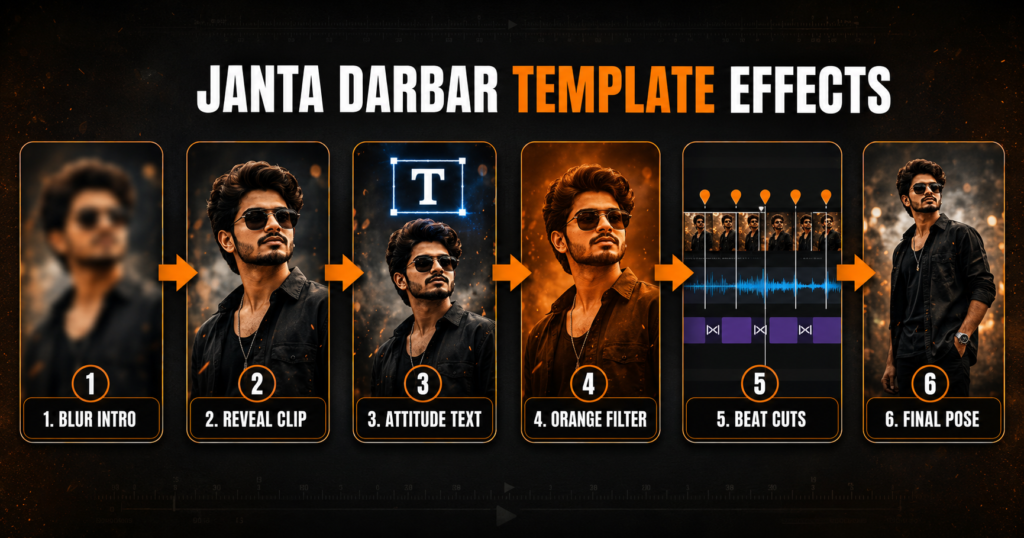
The edit usually opens with a blurred or partly hidden visual. This short suspense moment encourages the viewer to wait for the reveal. A clear clip then appears, followed by another attitude shot with text near the upper part of the frame. An orange-toned filter gives the footage a warmer, more dramatic look, while cuts and transitions follow the rhythm of the Bhojpuri song.
Because the template uses several media slots, one long recording may not be enough. Prepare multiple clips before opening the link. A collection of short walking shots, turns, close-ups and final poses will give you more freedom when filling the placeholders.
Janta Darbar Template Details
| Detail | Information |
|---|---|
| Template style | Bhojpuri attitude Reel |
| Main visual mood | Confident, dramatic and energetic |
| Intro effect | Blur or suspense reveal |
| Other elements | Attitude text, beat cuts and transitions |
| Colour style | Warm orange filter |
| Media needed | Multiple video clips; confirm in the live preview |
| Recommended recording | Vertical 9:16 video |
| Suggested export | 1080 × 1920 pixels |
| Best suited for | Reels, Shorts and status videos |
| Skill level | Beginner-friendly |
The exact clip count, duration, text and music can change if a template creator updates or removes a project. Always treat the current preview inside the official application as the final reference.
Why Use a CapCut Template for This Trend?
A manual edit requires you to identify every beat, trim each shot, build the blur reveal, add text, select transitions and colour-grade all clips consistently. A template reduces this work by carrying the original editor’s sequence into a reusable project.
This is particularly helpful when you are new to video editing or want to publish a short-form video quickly. You can concentrate on recording better footage rather than rebuilding an effect from the beginning. Templates also let you test several versions of the same idea by changing the selected clips.
However, a template does not automatically make weak footage look professional. The final quality still depends on lighting, camera stability, framing, expressions and clip order. It also cannot guarantee views or make a video viral. Audience interest, timing, originality and the platform’s recommendation system all influence reach.
Janta Darbar CapCut Template Link 1
This is the main link supplied for the trend. Open it on a phone with CapCut installed, watch the complete preview and note how many video slots are required before choosing your footage.
Janta Darbar CapCut Template Link 2
Use the second link as an alternative version. Its timing, audio, number of placeholders or effects may differ from the first one, so do not select media until you have watched its current preview.
Template disclaimer: Template availability can vary by country, account, device and application version. A creator may also delete, replace or restrict a shared project. These buttons lead to publicly shared template links. This website is not affiliated with CapCut, and the application name, logo, music and templates belong to their respective owners or creators.
How to Choose the Perfect Clips
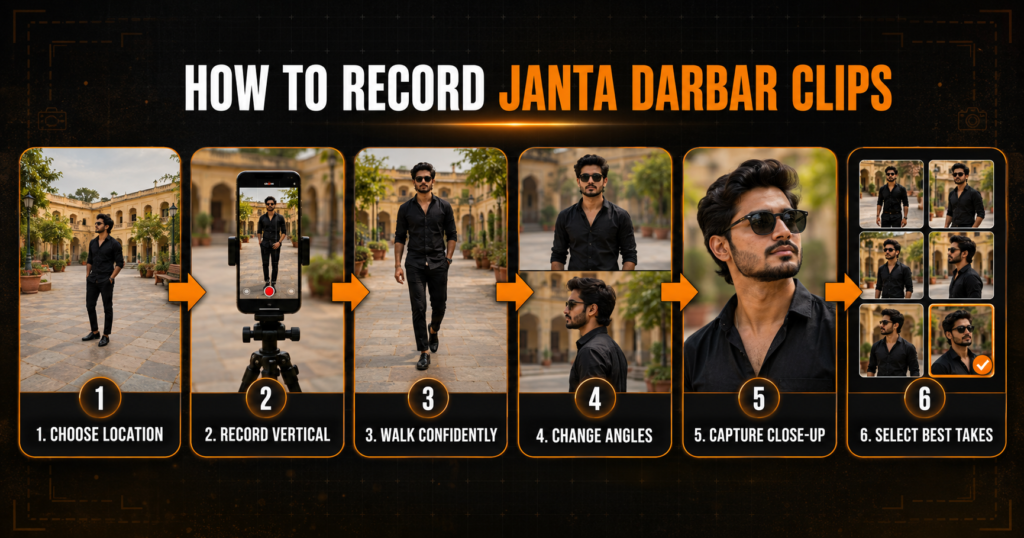
This template works best with confident footage that matches the attitude of the audio. Record vertically and keep the person near the centre of the frame. Leave some space above the head and around the body because a template may crop or zoom the video during a transition.
Walking shots are a strong choice. Begin several steps away from the camera and walk forward at a natural speed while looking ahead. You can also record a side-angle walk, a slow turn towards the camera, a close-up expression and a still final pose. These variations prevent the edit from looking as if the same moment has simply been repeated.
Choose a clean and safe location such as a quiet courtyard, open ground, building entrance or pedestrian area. Avoid active roads, railway tracks, rooftops without barriers and locations where recording could interrupt other people. If the background is busy, the text and blur reveal may become difficult to see.
Wear an outfit that contrasts with the location and avoid very small patterns that can look distracting after compression. The orange filter will warm the colours, so neutral, black, white, denim or earthy clothing can work well. You do not need expensive clothes; neat styling and confident body language matter more.
How to Record Clips for the Janta Darbar Edit
Clean the camera lens before recording. Use the rear camera when possible, ask a friend to hold the phone or place it on a stable tripod. Record in daylight or face a bright, soft light so facial details remain visible after the warm filter is applied.
Capture each action for at least four to six seconds, even if the final placeholder uses only a short portion. Begin recording before you start moving and wait a moment before stopping. This gives the template enough clean footage to crop.
Prepare three to six takes using different framing:
- A full-body walking clip for the opening or main reveal.
- A medium shot from the waist up for the attitude text scene.
- A side-angle walk or shoulder turn for a transition.
- A close-up with a calm, confident expression.
- A final pose with minimal movement for the ending.
Keep all clips in the same orientation and use similar lighting. If one shot is bright daylight and another is dark indoor footage, the completed edit may look inconsistent.
Suggested Clip Order
The live template preview should always take priority, but the following sequence can help you organize your gallery before selecting media:
Blurred Walking Clip → Clear Front View → Text Scene → Side-Angle Clip → Close-Up → Final Attitude Pose
Use your strongest clip for the first clear reveal rather than saving it for the end. The opening seconds are important in short-form video. If the project requires fewer placeholders, remove the weakest or most repetitive shot. If it needs more, add alternate angles rather than duplicating one identical clip.
How to Use the Janta Darbar CapCut Template
CapCut’s current official guidance describes the basic template workflow as selecting a template, choosing the required media, previewing the result and exporting it. Menu names can differ by app version and region, so follow the labels shown on your phone.
- Install or update CapCut from an official app store.
- Open this article on the phone where the application is installed.
- Tap one of the Use Janta Darbar CapCut Template buttons above.
- Allow the link to open in CapCut.
- Watch the complete preview and check the number and type of media slots.
- Tap Use Template.
- Select your clips in the same order as the sample sequence.
- Tap Preview or Next and wait for the project to process.
- Review every scene, including text placement, crop, timing and transitions.
- Replace or reposition any clip that does not fit correctly, where the template allows it.
- Tap Export, choose a suitable quality and save the finished video.
If the direct button does not open, search for the trend name in CapCut’s Template section if that section is available in your app. CapCut notes that the Template feature may not appear in every region or app version. Its official template help page also recommends using the mobile application for shared-template discovery and customization.
Check These Details Before Exporting
Watch the preview at least twice. During the first viewing, focus on the overall sequence. During the second, check individual details such as faces, hands, text, frame edges and the exact moment each transition occurs.
Make sure the blur intro becomes clear at the intended beat. Confirm that the attitude text does not cover the subject’s face. If a zoom cuts off the head or feet, replace that media with a clip recorded from farther away or adjust its position when the option is available.
Also listen to the full audio. A song may be muted, replaced or restricted on a social platform because of music licensing. Use audio permitted by the platform and your intended type of account. Adding another copyrighted song on top of the template can create overlapping sound and increase the chance of a claim.
Tips to Make the Attitude Reel Look Better
Keep Movements Controlled
Slow, deliberate walking and simple turns generally look better than quick, exaggerated gestures. The template already supplies motion through its transitions and zooms.
Match the Camera Direction
If you move from left to right in one clip, use a similar direction in the next shot when possible. Matching movement creates a smoother sequence.
Leave Room for Text
The edit may place attitude text in the upper portion of the video. Avoid positioning your face directly against that area. A little negative space makes the layout easier to read.
Use Original Camera Files
Videos forwarded through messaging applications are often compressed. Select the original recordings from your camera folder for a clearer export.
Avoid Too Many Extra Effects
The project already contains blur, colour treatment, text and transitions. Adding several more filters or stickers after export can make the result look crowded.
Use a Strong Cover Frame
Select a clear frame where your face and outfit are visible. Add a short, accurate caption rather than promising guaranteed viral results.
Best Export Settings
For Instagram Reels and YouTube Shorts, keep the project in a vertical 9:16 ratio. Export at 1080 × 1920 pixels when the original footage supports it. A frame rate of 30 FPS is suitable for most recordings, while 60 FPS can help when the source was recorded at 60 FPS and the project includes noticeable motion.
Choose a high-quality export without unnecessarily upscaling very low-resolution clips. Increasing the export number cannot restore details that were missing in the original footage. Save the file to your phone and watch it once outside the editor before publishing.
Suggested In-Post Image
Content: Vertical 9:16 → Original Clips → 1080p → Match Frame Rate → High Quality → Final Check
Size: 1731 × 909 pixels
Alt text: Best export settings for a Janta Darbar Bhojpuri Reel
Janta Darbar CapCut Template Not Working: Easy Solutions
The Link Does Not Open in CapCut
Open the page on a mobile device with CapCut installed. Update the application, restart it and try the link again. A desktop browser may not handle a mobile deep link correctly.
The Use Template Button Is Missing
The project may be unavailable in your region, removed by its creator or incompatible with your app version. CapCut’s template availability guidance confirms that some effects and templates can have regional availability. Try the second link rather than installing an unknown modified application.
The Template Tab Does Not Appear
Update CapCut and sign in if required. The template ecosystem may not be available for every region or version. You can still test the supplied mobile links, but there is no guarantee that a restricted project will open.
Clips Appear in the Wrong Order
Return to media selection and compare your choices with the live preview. Arrange the walking, close-up and pose clips according to the placeholder sequence.
The Subject Is Cropped
Use vertical footage with more space around the body. Replace a tight close-up with a wider shot, or reposition the media inside the placeholder if crop controls are available.
The Orange Filter Looks Too Strong
Choose a naturally lit clip without another heavy filter. If editing controls are available, reduce extra colour adjustments instead of stacking more filters.
The Preview Is Blurry
Wait for all assets to load on a stable connection. Make sure you selected original high-resolution files rather than downloaded copies or screen recordings.
The Export Stops or Fails
Free some phone storage, close unused applications, restart CapCut and retry. Long high-resolution clips can need more temporary storage during processing.
The Exported Video Has No Sound
Check device volume and the editor’s audio controls. The song may be unavailable because of licensing or region restrictions. Select suitable permitted audio on the platform where you will publish.
Copyright, Privacy and Safe Recording
Use footage that you own or have permission to edit. Ask before including another person, particularly a child or someone recorded in a private place. Avoid showing vehicle plates, addresses, school details, identity documents or other private information in the background.
Songs, effects, template designs and logos may be protected by their respective owners. A publicly accessible template link does not transfer ownership of its music or graphic elements. Follow the rules of the social network where you plan to upload the result, especially if the account is used commercially.
Download CapCut only from an official source. Modified APK files, premium-unlock claims and login bypasses can expose your device or account to unnecessary risk. Never share an OTP, password or payment information with a third-party template website.
Record in a safe pedestrian location. Do not walk in moving traffic, stand on railway tracks, climb unsafe structures or disturb people for an attitude shot. A simple location with good light is enough for an effective video.
You can also try our 15 August AI Photo Editing Prompts 2026
Frequently Asked Questions
What is the Janta Darbar CapCut Template?
It is a ready-made short-video project associated with a Bhojpuri song or attitude trend. It can apply prepared timing, blur, text, transitions and colour effects to selected clips.
Is this page related to an official Janta Darbar?
No. “Janta Darbar” here refers only to the entertainment template or song trend. The page is not an official government service or event notice.
How many clips does the template need?
The required number can differ between the two versions and may change over time. Open the current preview to see the exact media count before selecting files.
Can I use photos instead of videos?
Only if the selected template accepts photos. This attitude-style sequence is generally better suited to short video clips, but the live media slots are the final guide.
What type of video should I record?
Use vertical walking clips, turns, medium shots, close-ups and confident final poses. Keep the camera steady and the subject clearly lit.
Why is the template link not opening?
The project may be restricted by region, deleted by its creator, temporarily unavailable or incompatible with the current app version. Update the application and try the alternative link.
Can I use this template on a computer?
Shared deep links are most reliable in the CapCut mobile application. CapCut’s template features and online libraries can differ across mobile, web and desktop versions.
What is the best video ratio?
Use vertical 9:16 footage for full-screen Reels, Shorts and status videos.
What resolution should I choose?
Export at 1080 × 1920 pixels when the source clips are clear enough to support Full HD.
Why does my face look orange?
The template may already contain a warm colour filter. Use naturally lit footage without another strong filter and reduce additional colour effects where controls permit.
Can I change the text in the template?
It depends on whether the creator made that text editable. Check the preview or editing screen. Do not assume every built-in element can be changed.
Is the Janta Darbar template free?
Many publicly shared templates can be opened without a separate template fee, but specific assets or features may vary by account, app version or region. Always review any in-app label before continuing.
Does using the template guarantee viral views?
No. It can make editing faster, but reach depends on the footage, opening hook, audience response, posting time and platform recommendations.
Is it safe to download a modified CapCut APK?
It is safer to avoid modified applications and install software only from an official store or developer source.
Can I post the exported video on Instagram or YouTube?
Yes, provided you have permission to use the footage, music and other included material and follow the platform’s current rules.
Conclusion
The Janta Darbar CapCut Template is a convenient option for creating a short Bhojpuri attitude edit without manually building every blur, beat cut, text animation and orange colour effect. Start by watching both template previews, then choose the version that matches your preferred music, timing and number of clips.
Record several clear vertical shots in a safe location, place them in the required order and review every crop and transition before exporting. A strong walking clip, consistent lighting and a confident but natural pose will usually improve the result more than adding extra stickers or effects.
If one link is unavailable, update the official application and test the alternative version. Keep in mind that template access can change and no editing project can guarantee viral performance. Use your own footage, respect music rights and publish only after checking the complete exported video.
1 thought on “Janta Darbar CapCut Template 2026: Viral Bhojpuri Edit”