The Lapata Ho Jaibe CapCut Template is designed for creators who want to make a Bhojpuri attitude Reel without arranging every transition and effect manually. The template combines slow motion, blur and flash effects with Bhojpuri audio to create a bold short-video edit.
You can add your own vertical video, review the automatically applied effects and export the completed Reel from CapCut. This guide provides the original template link, suitable recording ideas, usage instructions and solutions to common problems.
Lapata Ho Jaibe CapCut Template Details
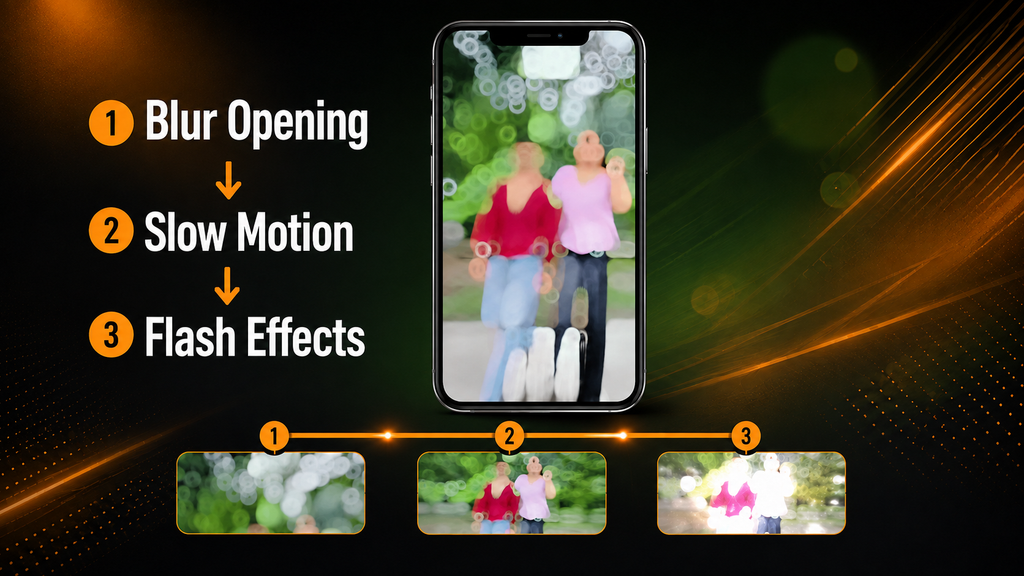
The edit begins with a blurred introduction that briefly hides part of the footage. The main video then becomes clearer, and slow motion gives the subject’s movement a smoother and more dramatic appearance.
Flash effects may appear at selected moments in the audio to emphasize the beat. The template is most suitable for a simple attitude-style clip because the prepared timing and effects already control the main visual flow.
| Detail | Information |
|---|---|
| Template name | Lapata Ho Jaibe |
| Editing app | CapCut |
| Main style | Bhojpuri attitude edit |
| Common effects | Halo blur, slow motion and flash |
| Recommended format | Vertical 9:16 video |
| Editing difficulty | Beginner-friendly |
| Suitable platforms | Instagram Reels, YouTube Shorts and Facebook Reels |
The final result will still depend on the quality of your original recording. A template can apply effects automatically, but it cannot correct severely blurred, dark or poorly framed footage.
Open the Lapata Ho Jaibe CapCut Template
Use the button below to open the publicly available project on CapCut:
Template disclaimer: This button directs users to a publicly shared project on CapCut. RoyEditors does not own CapCut or the linked template. The template, logo and associated trademarks belong to their respective owners. Availability may vary according to the creator, device, application version or region.
What Type of Video Should You Record?
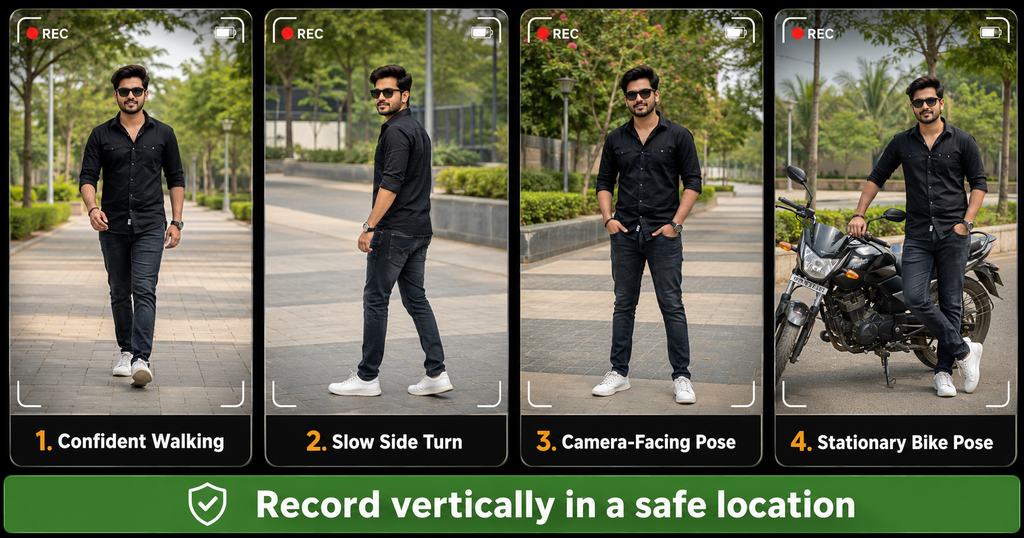
A steady vertical walking or posing clip should work well with this style. Record in portrait orientation and leave a little space around your face and body so CapCut can crop the footage correctly.
For better results:
- Clean the camera lens before recording.
- Use daylight or another soft light source.
- Keep the phone stable while recording.
- Wear clothing that contrasts with the background.
- Record each movement for a few extra seconds.
- Keep your face clearly visible.
- Avoid adding important text near the edges.
- Preview the slow-motion section before exporting.
You may record beside a stationary bike or car if it suits the attitude theme, but choose a safe location away from moving traffic. Never record while driving, riding or performing dangerous stunts.
How to Use the Lapata Ho Jaibe CapCut Template
Follow these steps on a supported mobile device:
- Install or update the official CapCut application.
- Open this article on the same phone.
- Tap the Check This Template on CapCut button.
- Allow the link to open in the official CapCut application.
- Watch the complete template preview.
- Select Use Template or the equivalent option shown in the app.
- Choose the required video clips from your gallery.
- Reposition or crop each clip carefully.
- Tap Next and wait for CapCut to prepare the edit.
- Check the slow motion, blur, flashes and audio timing.
- Correct any unsuitable crop or editable text.
- Export the completed video in the highest suitable quality.
Button names may differ slightly depending on your CapCut version and device.
Also, check our Raksha Bandhan AI Photo Editing Prompts 2026: 12 Styles
How to Make the Reel Look Better
Do not select footage only because it fits the required length. Choose a clip with movement that matches the attitude and timing of the audio.
A slow walk, controlled side turn or simple camera-facing pose usually works better than fast and unsteady movement. Keep your expression natural and avoid forcing every action to match an effect.
Before exporting, inspect the following:
- Is the face properly visible?
- Has CapCut cropped the head or feet?
- Does the slow motion appear smooth?
- Is any prewritten text incorrect?
- Are the flash effects comfortable to watch?
- Is the audio synchronized with the main movement?
- Does the preview contain an unwanted watermark or ending?
If possible, export at 1080 × 1920 pixels for a standard vertical Full HD video. Actual export options depend on your device and application version.
Template Not Opening? Try These Solutions
Update CapCut
An old application version may not support a recently created template. Update CapCut through the official application store and reopen the link.
Open the Link on Your Phone
CapCut template links are generally easier to use on a mobile device with the official application installed. If the link opens in a browser, select the option to continue in CapCut.
Check Regional Availability
CapCut and some of its templates may not be available in every location. RoyEditors cannot remove regional restrictions or restore a project that the original creator has withdrawn.
Try Again Later
A temporary connection or server problem can prevent the preview from loading. Switch to a stable internet connection, close the application and try again later.
Template Was Removed
Public templates can be updated, restricted or deleted by their creators. If the button no longer opens a valid preview, the project may have expired or been removed.
Frequently Asked Questions
What is the Lapata Ho Jaibe CapCut Template?
It is a ready-made CapCut project created for a Bhojpuri attitude-style video. It applies prepared effects and timing after you add your own footage.
Which effects are used in this template?
The shared preview describes a blurred introduction, slow-motion footage and flash effects. The exact appearance can change if the creator updates the template.
Can beginners use this template?
Yes. The main editing sequence is already arranged. Beginners still need to select suitable footage, inspect the crop and check the completed preview.
Is the template available for every device?
Availability depends on CapCut support, the user’s region, device compatibility and whether the original creator keeps the template active.
Can I use my own video?
Yes. You select footage from your phone’s gallery after opening the template. Vertical clips generally fit short-video platforms better.
Does this template guarantee a viral Reel?
No. A template cannot guarantee views or engagement. Results also depend on your footage, originality, audience, caption, timing and overall video quality.
Can I use the music commercially?
Do not assume that template audio is cleared for every commercial purpose. Music rights can differ by platform, country and type of account. Check the applicable platform and CapCut licensing information before commercial use.
Final Words
The Lapata Ho Jaibe CapCut Template offers a convenient way to create a Bhojpuri attitude Reel using a blurred opening, slow motion and flash effects. Its prepared editing sequence can save time, particularly for beginners who do not want to build every transition manually.
Use clear vertical footage, record in a safe location and watch the complete preview before exporting. Most importantly, customize the result carefully so your Reel reflects your own footage and style instead of looking like an unchanged copy of everyone else’s edit.

Renu Mishra Roy is the founder and editor of Roy Editors. She writes about trending CapCut templates, VN codes, and AI photo editing, testing each template herself before publishing so readers get steps that actually work. Her guides focus on helping creators make clean, viral-style Reels and Shorts without wasting time on complicated editing.
1 thought on “Lapata Ho Jaibe CapCut Template 2026: Link and Easy Guide”