Raksha Bandhan photographs preserve moments such as tying Rakhi, sharing sweets and exchanging gifts. Raksha Bandhan AI Photo Editing Prompts can transform a plain picture into a polished festive scene.
Raksha Bandhan was celebrated on Friday, 28 August 2026. These prompts cover portraits, selfies, collages and long-distance concepts. Review faces, hands, Rakhi and text before sharing.
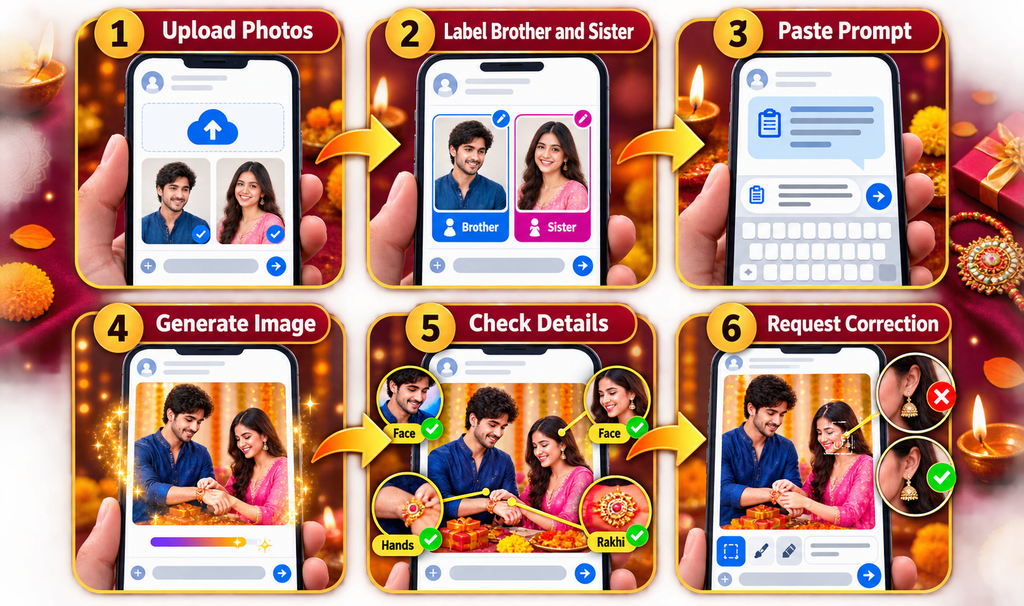
Quick answer: Upload clear photos that you have permission to use, identify which image shows the brother and which shows the sister, paste a suitable prompt, and request one targeted correction at a time if anything looks unnatural.
An AI photo-editing prompt describes the subjects, pose, outfits, ceremony, background, lighting, camera style and image ratio. Use front-facing references with visible facial details and no heavy filters. For two people, label separate uploads as Reference 1: Brother and Reference 2: Sister.
How to Keep Faces Recognisable
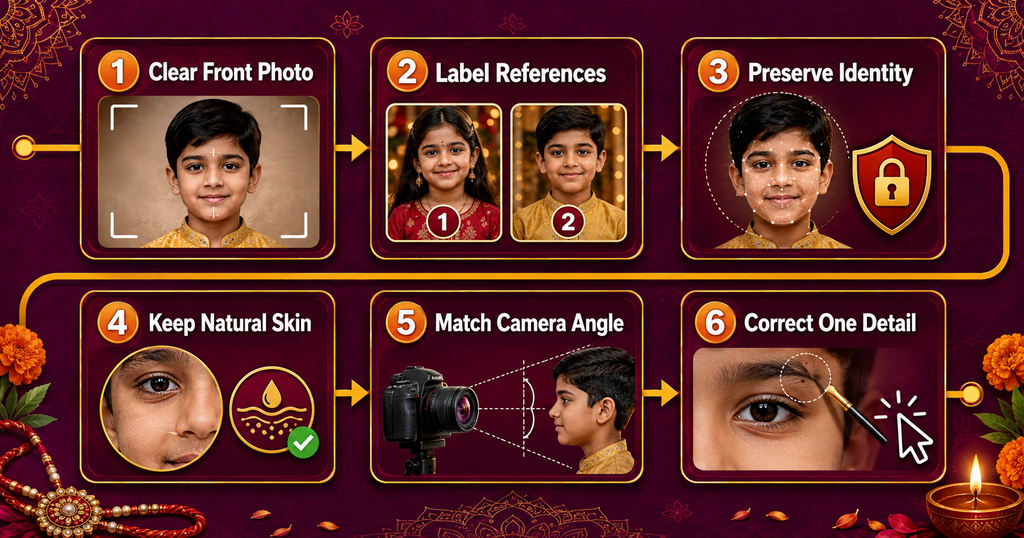
No AI tool can promise a perfect face match every time. These steps can improve consistency:
Upload a sharp image with the full face visible.
Use a recent photo that reflects the person’s current hairstyle and age.
Avoid sunglasses, extreme side angles, blur and harsh shadows.
State exactly which features must remain unchanged.
Ask for natural skin texture instead of plastic-looking smoothing.
Choose a pose and camera angle reasonably close to the reference.
Correct one problem at a time instead of rewriting the full scene.
Add this identity instruction to any prompt when using personal photos:
Use the uploaded image only as the identity reference. Preserve the same recognisable facial structure, eyes, eyebrows, nose, lips, jawline, skin tone, hairstyle, hair texture and age appearance. Keep natural skin texture. Do not beautify, reshape, replace or artificially smooth the face.
Use other people’s photographs only with permission, especially children’s images. Avoid exposing addresses, identity cards or school information.
Best Raksha Bandhan AI Photo Editing Prompts for 2026
Replace the bracketed details where needed. For two-person prompts, upload the brother’s and sister’s photographs and label them in the same order described in the prompt.
1. Natural Rakhi Ceremony at Home
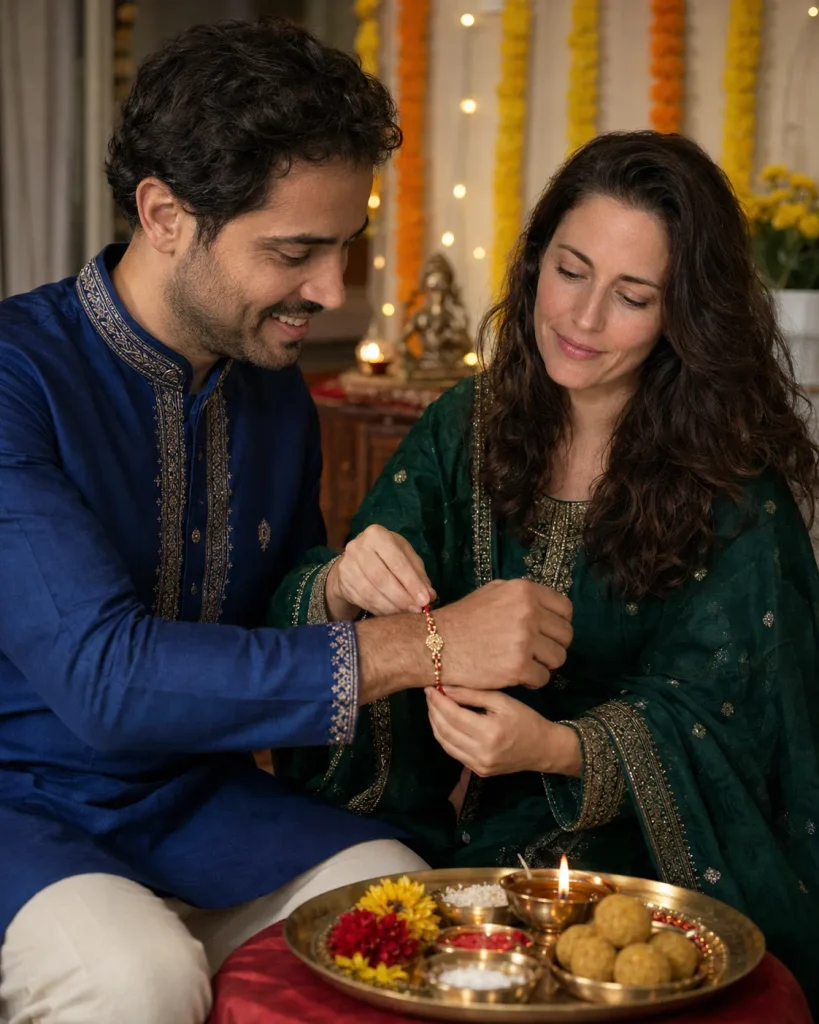
Create an ultra-realistic vertical 4:5 Raksha Bandhan photograph using two uploaded references: Image 1 is the brother and Image 2 is the sister. Preserve both recognisable identities, natural skin tones, hairstyles and age appearance. Show the sister tying a red-and-gold Rakhi on her brother’s wrist while both smile naturally. Dress the brother in a royal-blue embroidered kurta and the sister in an emerald-green salwar suit with a matching dupatta. Add a brass puja thali with diya, roli, rice, flowers and sweets, plus marigold garlands and warm fairy lights in a real Indian home. Natural hands, realistic Rakhi placement, soft golden light, DSLR portrait quality, no logo or watermark.
2. Mustard-Yellow Matching Outfit Portrait
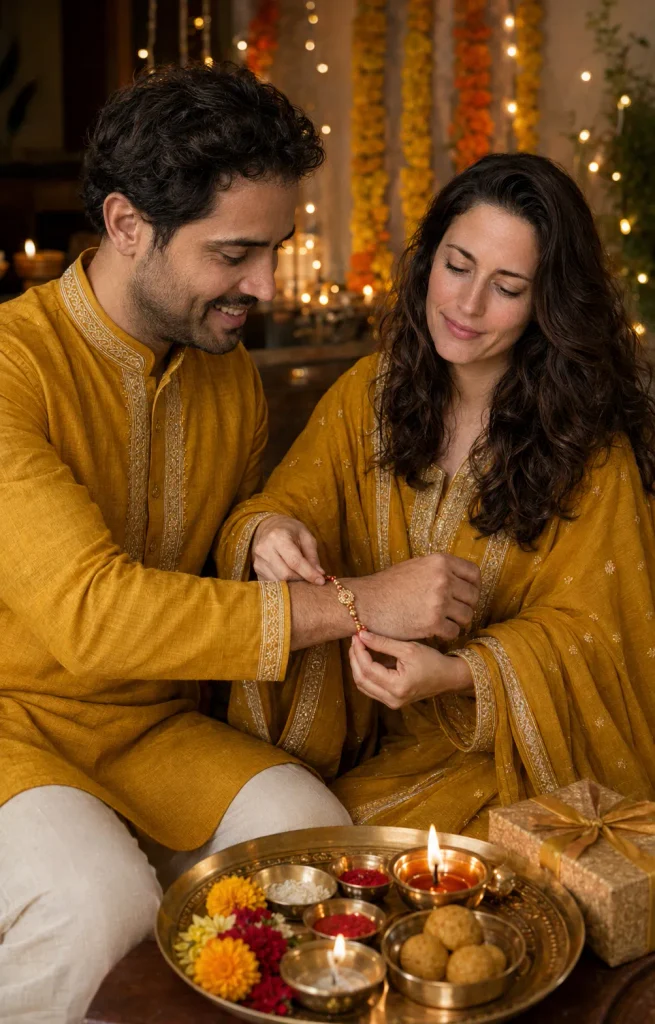
Create a realistic Raksha Bandhan brother-sister portrait in coordinated mustard-yellow traditional outfits. The sister gently ties Rakhi while the brother looks at her with a warm smile. Include marigold decorations, glowing diyas, a gift box, laddoos and a festive thali. Use premium indoor photography, warm golden light, soft background bokeh, accurate hands and natural facial expressions. Vertical 4:5 composition, realistic fabric texture, no artificial skin smoothing, no extra fingers, no text or watermark.
3. Cozy Bedroom Selfie
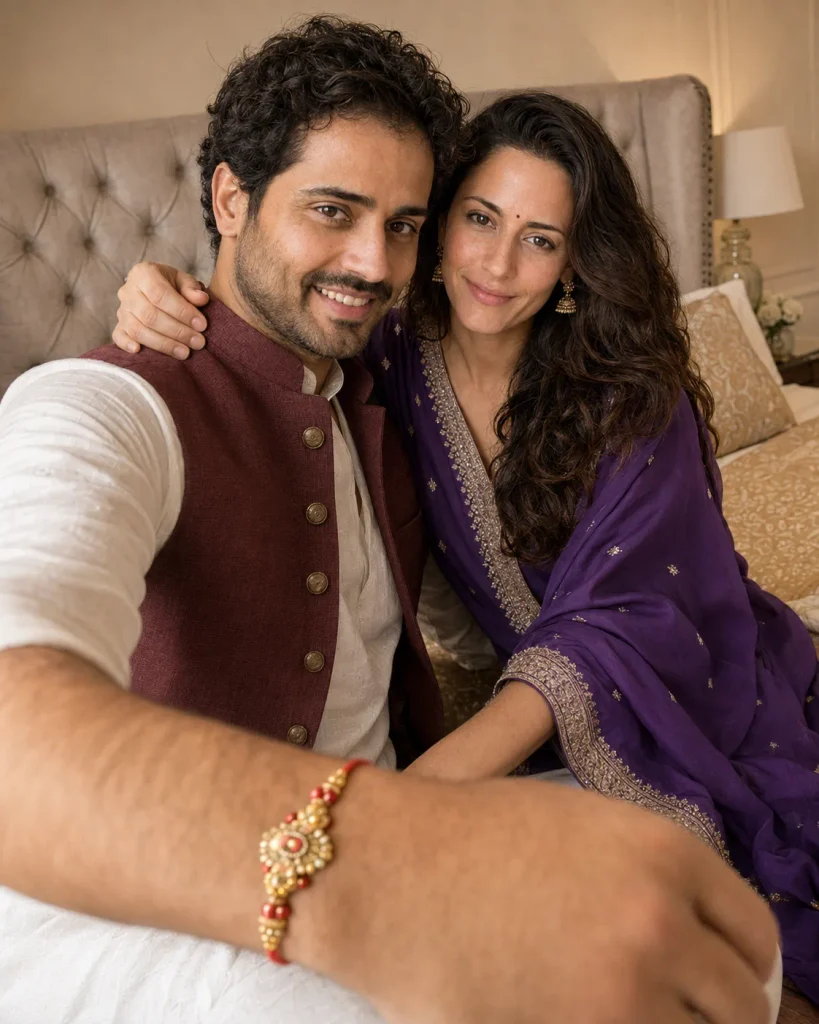
Use the two uploaded photos as identity references and create a candid vertical 4:5 smartphone selfie of a brother and sister celebrating Raksha Bandhan in a cosy, elegant bedroom. The brother wears a white kurta with a maroon Nehru jacket. The sister wears a purple salwar suit, small jhumka earrings and a tiny bindi, leaning naturally beside him with her arm around his shoulder. A colourful Rakhi is clearly visible on his wrist in the foreground. Warm indoor lighting, tufted headboard, believable front-camera perspective, natural skin and relaxed smiles, no text or logo.
4. Sister Feeding Sweets
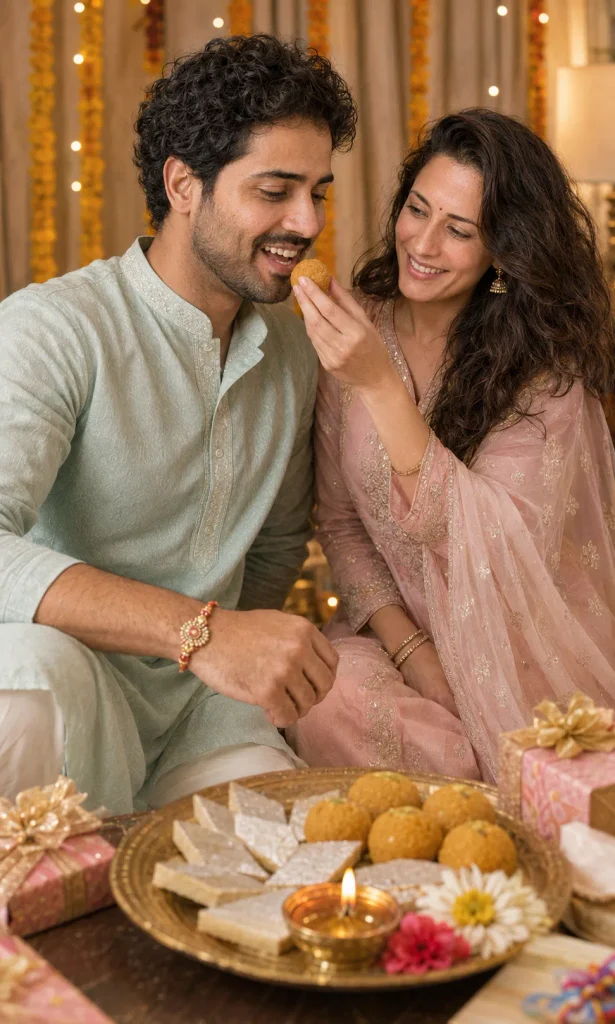
Create a photorealistic Raksha Bandhan moment in which an Indian sister feeds her brother a laddoo after tying Rakhi. Show both siblings laughing naturally in elegant pastel traditional clothing. Place a decorated thali, kaju katli, diya, flowers and wrapped gifts on a low table. Use a warm home setting with cream curtains, marigold garlands and soft fairy-light bokeh. Keep hands anatomically correct, sweets realistically sized and faces naturally expressive. Cinematic DSLR photography, vertical 4:5, no watermark.
5. Premium Black-and-Silver Celebration
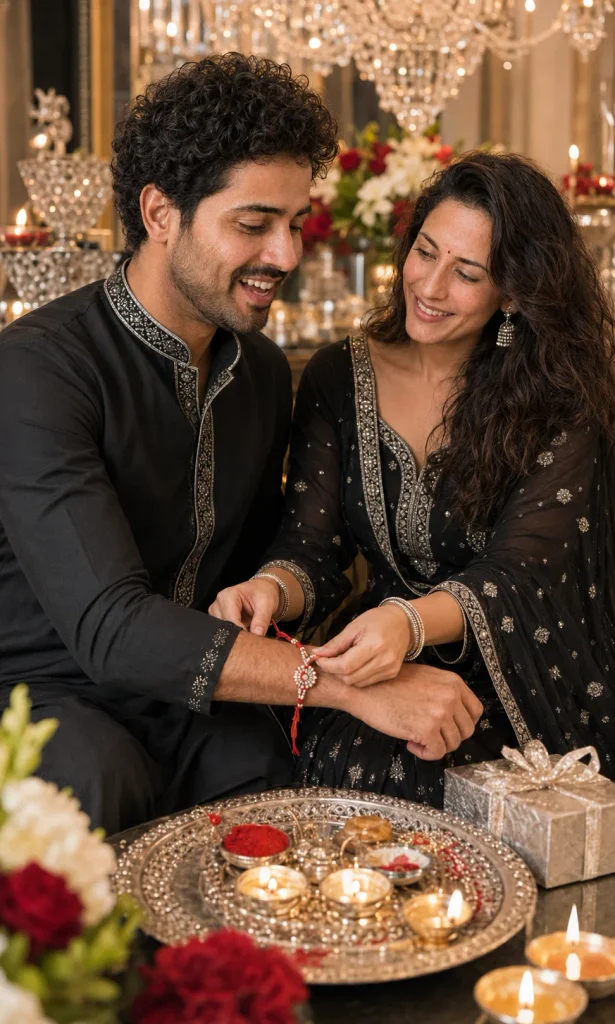
Create a premium cinematic Raksha Bandhan portrait of a young Indian brother and sister seated together in an elegant festive interior. The brother wears a black kurta-pajama with subtle silver embroidery; the sister wears a black lehenga with tasteful silver embroidery, traditional earrings and bangles. Show her tying a detailed red-white-and-silver Rakhi on his wrist. Add white and red flowers, crystal decorations, a chandelier, silver gift box, diyas and a decorated thali in the foreground. Balanced exposure, natural expressions, realistic jewellery, hands and fabric, vertical portrait, sophisticated black-silver-red palette.
6. Seven-Memory Scrapbook Collage
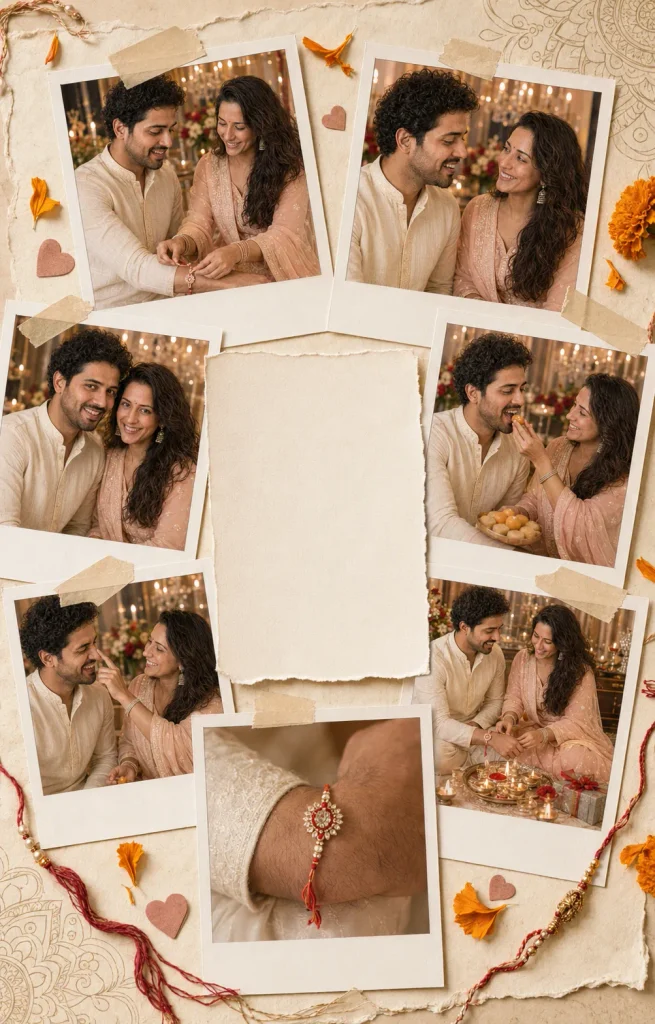
Create a vertical 4:5 handmade Raksha Bandhan scrapbook collage using the same uploaded brother and sister consistently. Include seven Polaroid-style photographs: tying Rakhi, smiling at each other, posing together, sharing sweets, playful teasing, sitting near the puja setup and a close-up of the Rakhi. Dress them in coordinated pastel Indian outfits. Arrange the photos on cream textured paper with torn edges, masking tape, marigold petals, small hearts, Rakhi threads and subtle mandala details. Warm nostalgic lighting, natural faces and hands, realistic paper shadows. Leave a clean blank card in the centre so accurate greeting text can be added later in a design app.
7. Brother Hiding a Surprise Gift
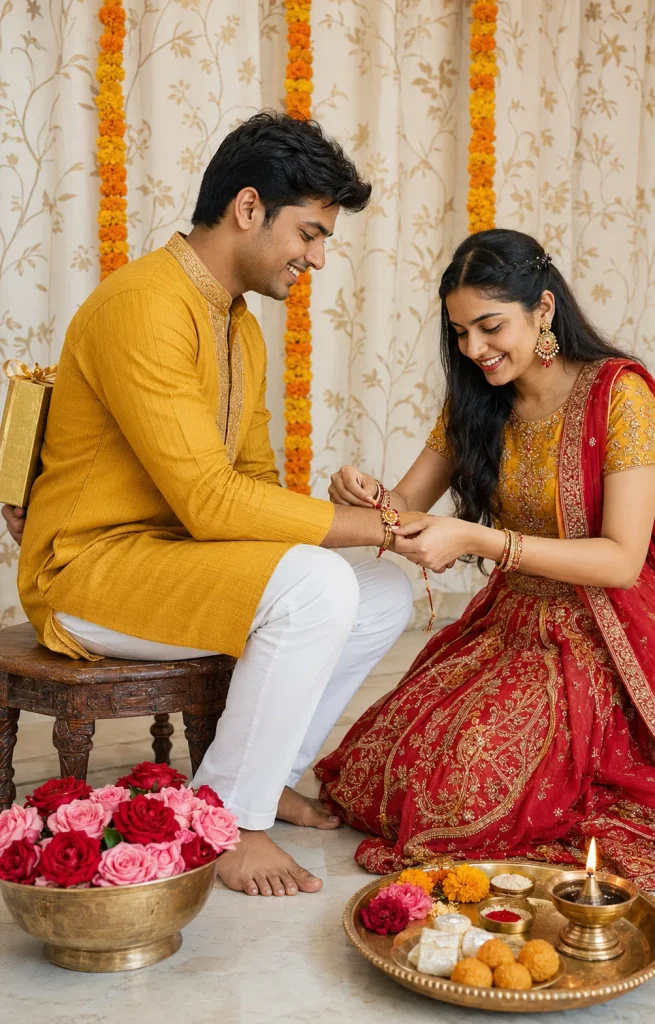
Create a joyful studio-style Raksha Bandhan portrait of an Indian brother and sister. The brother sits on a low wooden stool in a mustard shirt and white trousers, playfully hiding a gold-wrapped gift behind his back. His younger sister, wearing a red-and-mustard lehenga with bangles, smiles while tying Rakhi on his extended wrist. Add a cream curtain with gold botanical patterns, marigold garlands, a brass bowl of roses and a puja thali containing sweets, roli, rice and a lit diya. Bright natural studio lighting, respectful sibling pose, realistic anatomy, vertical 4:5.
8. Rakhi Gift Poster for Brother
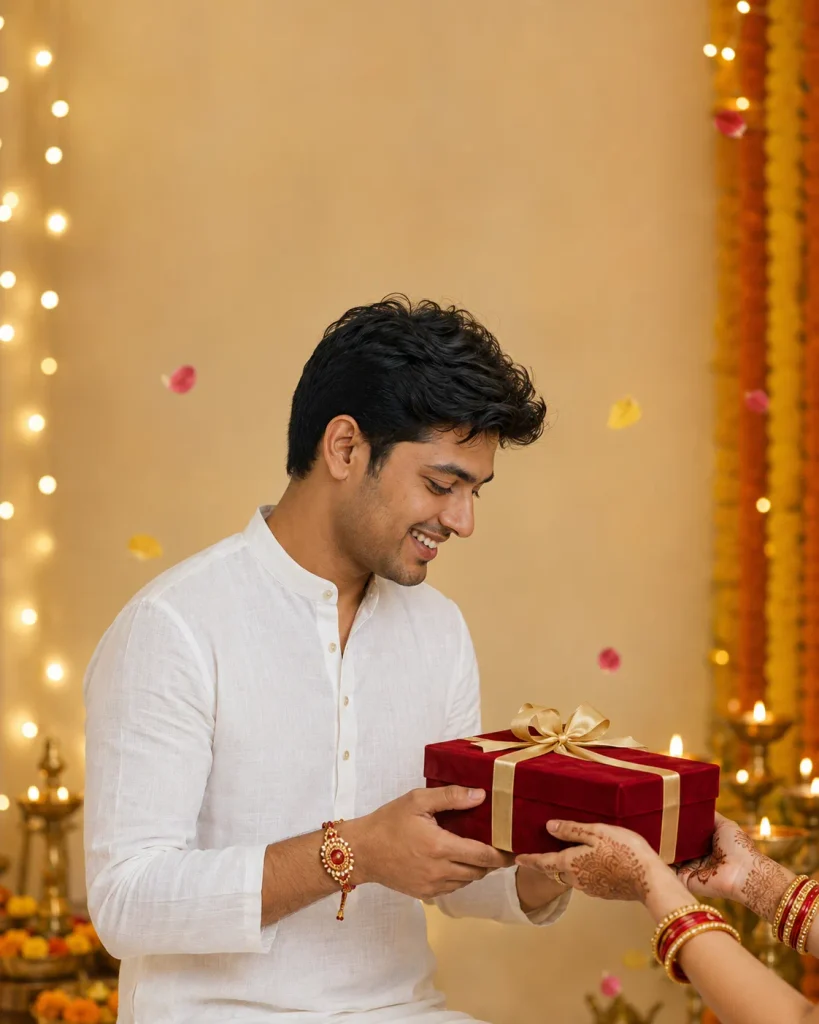
Use the uploaded man’s photo as the identity reference. Create a realistic vertical 4:5 Raksha Bandhan campaign portrait of him wearing a premium white linen kurta and presenting a red velvet gift box with a gold ribbon. Only his sister’s graceful mehndi hands with red-gold bangles are visible receiving the gift, and a colourful Rakhi is already tied on his wrist. Add marigold decorations, brass diyas, floating flower petals and warm fairy lights. Premium editorial photography, realistic skin and fabric, soft cinematic bokeh. Leave clear space at the top for a greeting to be added later; no generated text or watermark.
9. Close-Up Rakhi and Mehndi Hands
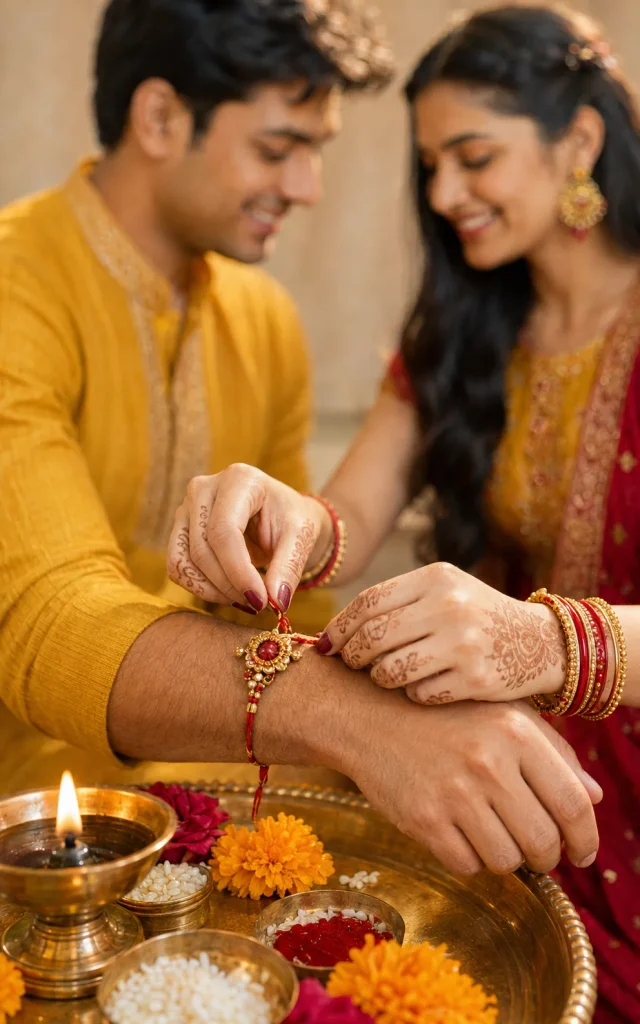
Create an ultra-realistic close-up Raksha Bandhan photograph focusing on a sister’s mehndi-covered hands tying a handcrafted red-and-gold Rakhi around her brother’s wrist. Keep the hands anatomically correct and the thread naturally wrapped. Show the siblings’ softly smiling faces in the blurred background. Include a brass thali with roli, rice, marigold petals and a glowing diya. Warm sunlight, shallow depth of field, detailed jewellery and skin texture, 85mm macro-portrait style, vertical 4:5, no text.
10. Minimal Modern Raksha Bandhan Campaign
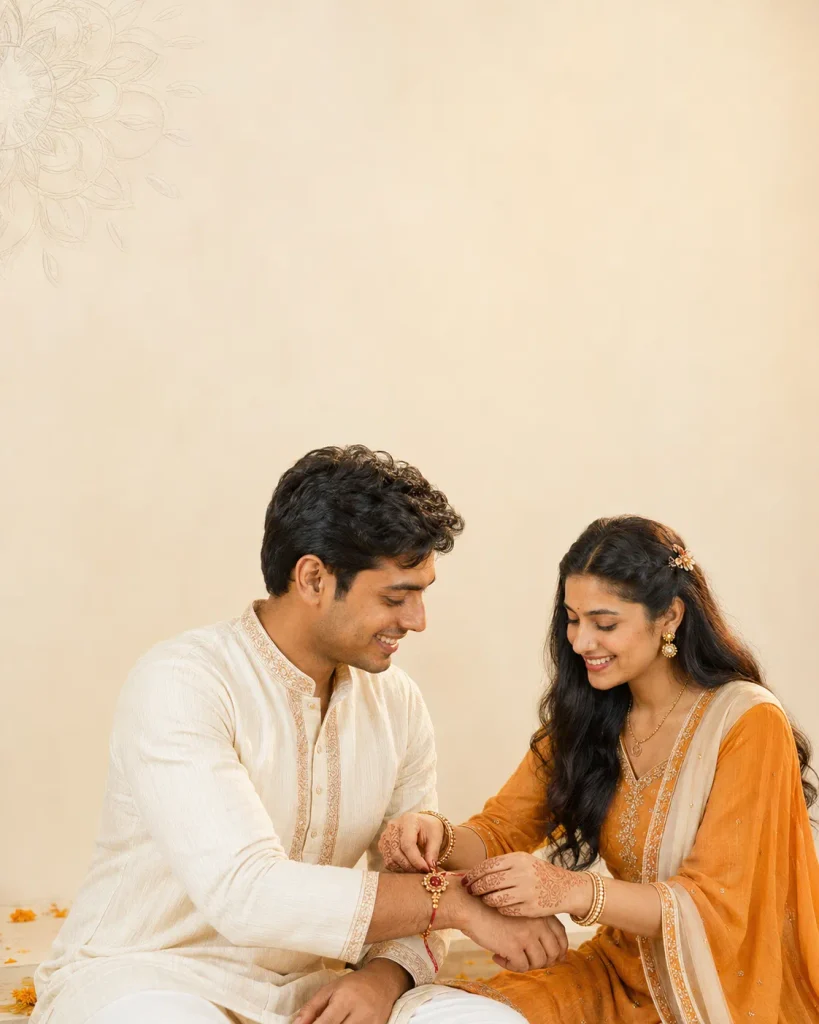
Create a premium minimalist Raksha Bandhan poster showing a young Indian sister tying a handcrafted Rakhi while her brother looks at her with a genuine smile. Use elegant ivory and muted-saffron traditional outfits against a clean cream background with one subtle mandala, a few marigold petals and soft golden shadows. Keep the composition uncluttered with generous empty space for a headline. Natural skin texture, accurate hands, refined editorial lighting, vertical 4:5, realistic photography, no generated words, logos or watermark.
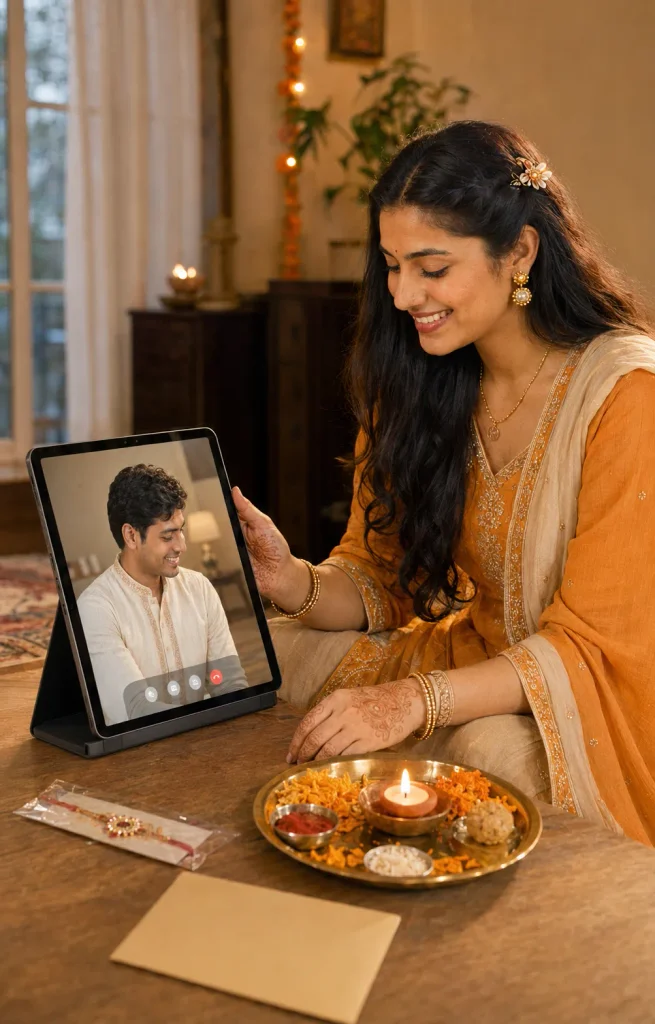
11. Long-Distance Video-Call Celebration
Create a warm, realistic Raksha Bandhan scene about siblings living far apart. Show an Indian sister seated beside a decorated puja thali during a video call with her brother displayed clearly on an unbranded tablet screen. A packaged Rakhi and handwritten envelope rest nearby, while the brother smiles from his own simple room. Use marigold flowers, diya glow and soft evening light. Respectful emotional mood, believable screen perspective, natural hands and faces, vertical 4:5, no app logos, readable private details or watermark.
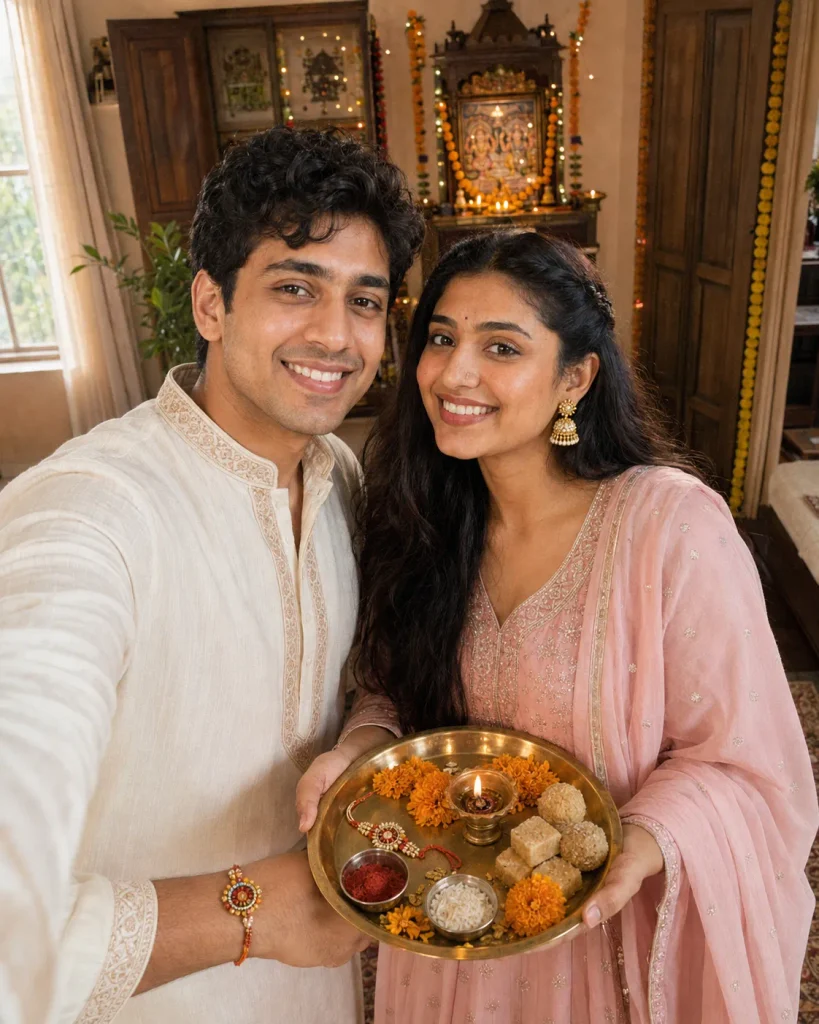
12. Traditional Temple-Corner Selfie
Use two uploaded identity references to create a natural Raksha Bandhan selfie inside a decorated Indian home. The sister stands slightly in front holding a brass puja thali with Rakhi, roli, rice, diya, marigold flowers and sweets. The brother stands beside her in an ivory embroidered kurta with the Rakhi visible on his wrist. She wears a pastel-pink Anarkali with a matching dupatta and jhumkas. Add a softly blurred home temple, wooden décor, garlands and fairy lights behind them. Realistic smartphone perspective, bright natural faces, authentic expressions, detailed hands, vertical 4:5, no text or watermark.
ChatGPT allows you to describe a new image or upload an existing one and request changes:
Open ChatGPT and start a new conversation.
Upload a clear photograph of each person you want included.
State which image is the brother and which is the sister.
Copy one prompt from this article and adjust outfits, ages or setting if needed.
Submit the request and wait for the image to generate.
Inspect faces, hands, Rakhi, jewellery, thali and background carefully.
Request one precise correction, such as “change only the brother’s right hand; keep both faces and the rest of the image unchanged.”
Save the final image only after checking it at full size.
For a local correction, select the affected area where available and describe only the required change.
Common Mistakes to Avoid
Too many flowers, gifts, lights, words and props can make a family photograph artificial. A Rakhi, smile, simple thali and warm light are often enough. “8K” wording cannot repair a weak reference or distorted anatomy. Ask for blank headline space and add greeting text later in a design tool. Before publishing, check that the Rakhi wraps naturally and sacred items sit correctly in the thali.
How to Fix Common AI Photo Problems
The face does not look similar
Upload a clearer front-facing image and ask to correct only that face while preserving the scene. A closer crop may improve similarity.
Hands or fingers look unnatural
Specify the action: “The sister’s right hand ties the Rakhi around the brother’s left wrist.” Simplify the pose if the problem remains.
The brother and sister are mixed up
Label each reference, clothing and position: “Image 1 is the brother on the left; Image 2 is the sister on the right.”
Skin looks plastic
Ask for natural pores, realistic highlights and no beauty filter.
The image contains misspelled text
Regenerate without text and add the greeting afterward in a design application.
Privacy, Safety and Copyright
Use only authorised photographs, with parental approval for children. Do not present a generated ceremony as documentary proof of a real event. Label the result as AI-created or edited when relevant, and avoid celebrity faces or protected compositions without permission.
Conclusion
These Raksha Bandhan AI Photo Editing Prompts can create sibling portraits, ceremony photos, gift posters, selfies and collages. Begin with clear, authorised references, keep the scene respectful and check faces, hands and Rakhi placement. Correct one problem at a time for a more controlled result.
Renu Mishra Roy is the founder and editor of Roy Editors. She writes about trending CapCut templates, VN codes, and AI photo editing, testing each template herself before publishing so readers get steps that actually work. Her guides focus on helping creators make clean, viral-style Reels and Shorts without wasting time on complicated editing.



1 thought on “Raksha Bandhan AI Photo Editing Prompts 2026: 12 Styles”