India celebrates Independence Day every year on 15 August with pride, gratitude and respect. As the national celebration approaches, patriotic photos, Instagram Reels, YouTube Shorts and WhatsApp Status videos begin appearing across social media. One of the most popular editing styles places the Indian tricolour behind a person, adds smooth slow motion and creates a powerful cinematic moment.
The 15 August CapCut Template makes this type of video easier to create, even if you have little editing experience. You only need to record a suitable clip, open the template, add your video and check the preview. The template handles most of the timing, background effect and transitions automatically.
In this guide, you will learn what the viral template looks like, how to prepare your clip, how to use the template link, which export settings to select and how to solve common problems. The article also includes practical tips for creating a respectful and attractive Independence Day edit for an Indian audience.
What Is the 15 August CapCut Template?
A CapCut template is a ready-made video project containing effects, transitions, timing and music synchronization. Instead of building an edit manually, you add your own media to the available placeholder and let the template apply its preset style.
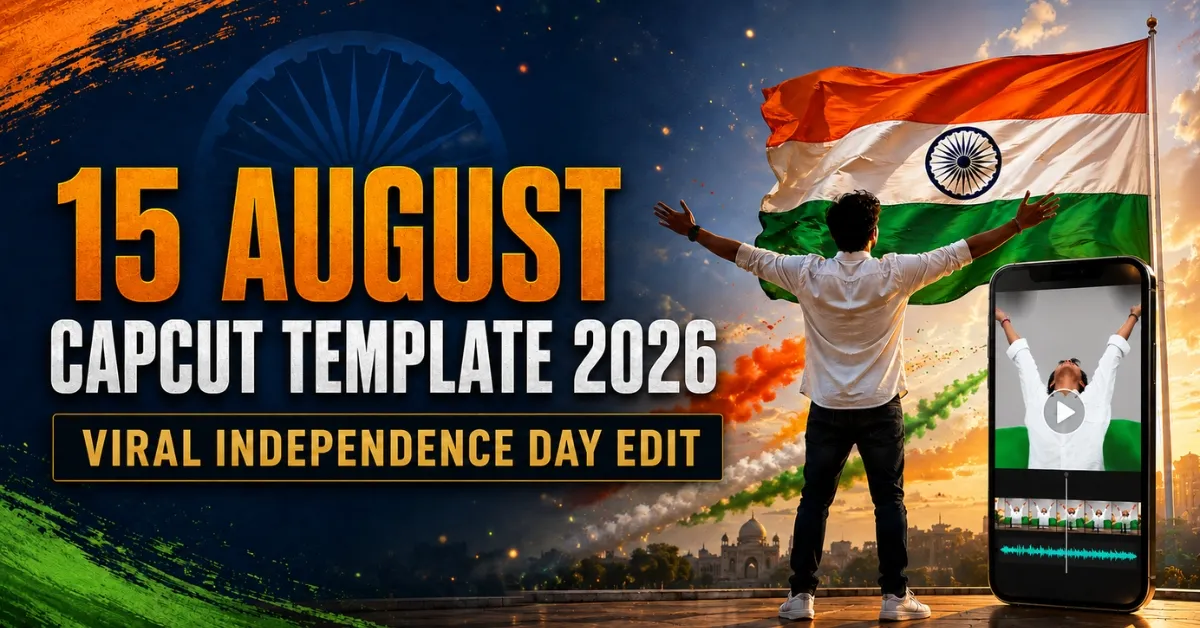
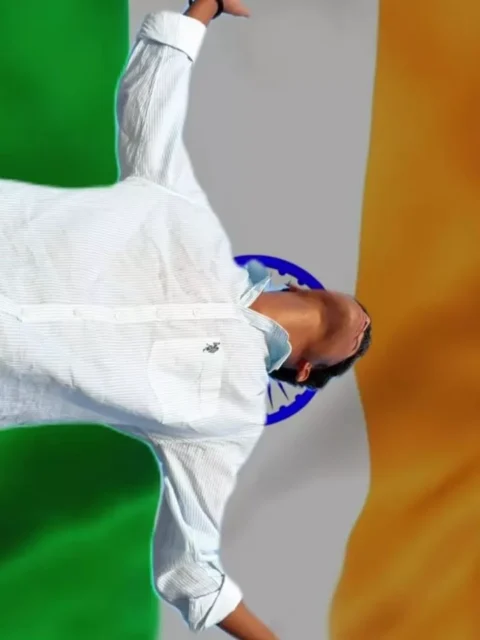
The 15 August CapCut Template 2026 is designed for Indian Independence Day videos. In the viral version, a person stands outdoors with their arms open while looking towards the sky. The ordinary background is then replaced or covered with a moving Indian tricolour. Slow motion and beat-synchronized effects make the transformation look more dramatic.
This style works well for Instagram Reels, Facebook videos, YouTube Shorts and Independence Day WhatsApp Status posts. However, the final quality depends heavily on the clip you record. A clear subject and visible sky give the effect enough space to appear properly.
What Does the Viral Independence Day Edit Look Like?
The video normally begins with a person standing or walking in a simple outdoor setting. The subject then looks upwards or opens both arms while the music builds. As the beat changes, the original background transforms into a large waving Tiranga or a tricolour sky effect.
Some versions also include slow motion, a flash transition, cinematic zoom, blur or bracket-style effects. The person remains visible in front while the saffron, white and green colours move behind them. The result looks patriotic and dramatic without requiring complicated manual editing.
The exact number of clips, duration and effects may differ if the template creator updates the project. Always watch the preview before selecting your media.
15 August CapCut Template Details
| Detail | Information |
|---|---|
| Template name | 15 August Independence Day |
| Editing application | CapCut |
| Editing style | Tricolour background and slow motion |
| Media required | Usually one suitable video clip |
| Recommended format | Vertical 9:16 |
| Recommended quality | 1080p |
| Best for | Reels, Shorts and WhatsApp Status |
| Skill level | Beginner-friendly |
| Availability | May vary by region |
Do not rely on an exact duration or media count until you open the current template preview. Different versions of the same trend can require different clips.
15 August CapCut Template
Use the button below to open the template. It should redirect you to the template preview in the official CapCut application.
Important note: Template availability can vary by device, application version and country. If the button does not open, update CapCut and try opening the link directly on your phone. The link leads to a publicly shared template. This website is not affiliated with CapCut, and all application names, logos and templates belong to their respective owners or creators.
What You Need Before Starting
Before recording, install or update CapCut on your phone. You will also need a stable internet connection, enough storage space and a clear vertical video. Clean the camera lens before shooting because even a small smudge can reduce video quality, especially when sunlight is visible.
Wear an outfit that stands out against the sky and surroundings. White, navy blue or another solid colour can work well. If you wear tricolour clothing, keep the design tasteful and avoid placing national symbols in an inappropriate position.
Your clip should preferably be recorded in the same 9:16 vertical format used by Instagram Reels and YouTube Shorts. This prevents unnecessary cropping later.
How to Prepare the Best Clip for This Editing
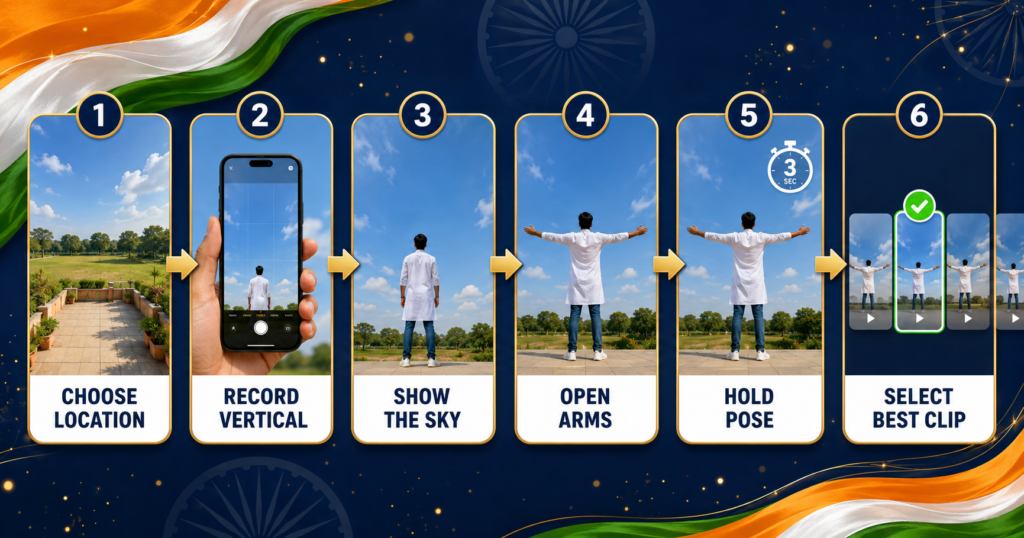
Choose an open location such as a rooftop, terrace, field, courtyard or quiet outdoor area where plenty of sky is visible behind you. Make sure the location is safe and avoid standing near an unprotected roof edge, traffic or electrical wires.
Place the camera slightly below or around chest height and tilt it gently upwards so your full body and the sky appear together. The competitor description suggests a high angle, but for this particular effect, a slightly low or level angle often gives the tricolour background more visible space. The important point is to frame the subject clearly without cutting off the head, hands or feet.
Stand in the centre and slowly spread both arms while looking towards the sky. Hold the final pose for four to five seconds. Move naturally and avoid sudden jerks because smooth movement works better with slow motion. Record two or three takes so you can choose the clearest one.
Use daylight when possible, but do not point the camera directly at harsh midday sunlight. Early morning or late afternoon light usually produces softer shadows and a more attractive result. Keep the camera stable with a tripod, stand or help from another person.
How to Use the 15 August CapCut Template
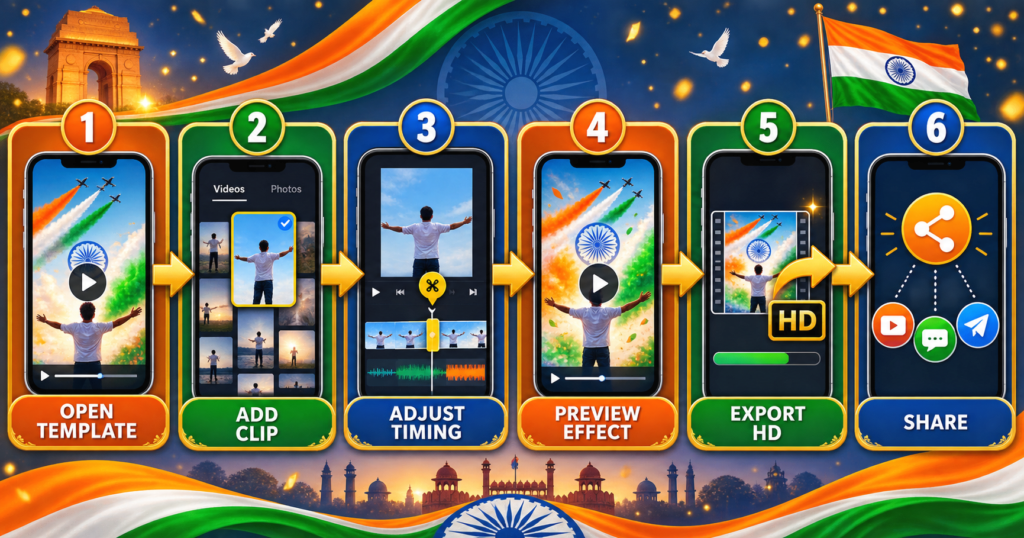
First, install or update the official CapCut application. Return to this article on your phone and tap the template button. Allow the link to open in CapCut, then watch the complete preview so you understand where your movement will appear.
Tap Use Template or the equivalent option shown in your version of the application. Select the video you recorded and confirm the required media slot. Adjust the clip if CapCut allows trimming or repositioning. Keep the moment where you open your arms and look up around the main transition point.
Tap Preview or Next and wait for the effects to process. Watch the entire result carefully. Check whether the subject is clearly separated from the background, the hands remain visible and the tricolour effect appears at the correct moment. If the timing looks wrong, return to the media-selection screen and choose a slightly earlier or later part of the clip.
Once the preview looks right, tap Export. Select high quality and save the finished video to your gallery. You can then upload it as an Instagram Reel, YouTube Short, Facebook video or WhatsApp Status.
How to Make the Tricolour Background Look Realistic
The cleanest result comes from a clip with a simple background. A clear sky is ideal because it has fewer objects for the editing effect to separate. Crowded buildings, trees crossing the body, moving vehicles and other people can make the background replacement look untidy.
Keep a visible gap between your arms and body. This helps the effect recognize the outline more clearly. Avoid loose objects moving across your body, and do not record in very low light. Your clothing should contrast with the background so your outline remains visible after the Tiranga effect appears.
Do not apply strong beauty filters before adding the clip. Filters can reduce edge detail and make the final video look artificial. Complete the template edit first, then make only small colour or brightness adjustments if needed.
You can also try our Lord Krishna CapCut Template
Best Export Settings for Reels and WhatsApp Status
For most social platforms, use a 9:16 aspect ratio with 1080 × 1920 resolution. Select 30 FPS unless your original clip was recorded at a higher frame rate and the template supports it. Choose high quality and MP4 format when those options are available.
Avoid repeatedly saving and forwarding the video before publishing because every additional compression can reduce sharpness. Upload the original exported file directly from your gallery. For WhatsApp Status, the platform may compress the video automatically, so begin with a clear 1080p export.
How to Remove the CapCut Ending
Some exports include a CapCut ending card. Before exporting, check whether the application shows an official option such as Export without watermark or Save and share without ending. The wording may vary between versions.
If an ending clip appears in the editing timeline and can be selected normally, remove that final clip before export. Only use the options provided by the application, and do not download modified applications from unknown websites.
15 August CapCut Template Not Working: Solutions
Template Link Does Not Open
Make sure CapCut is installed and updated. Open this article on the same phone, tap the button again and allow your browser to redirect to the application. If the template still does not open, it may be unavailable in your region or temporarily removed.
Use Template Button Is Missing
This can happen when a template has been restricted, deleted or made unavailable for a particular region. Try again later or search inside CapCut using phrases such as 15 August CapCut Template, Independence Day Template or Tiranga Template.
Tricolour Background Looks Untidy
Use a clip with a clear sky, stable camera and strong separation between your body and the background. Avoid crowds and complicated scenery. Record again in better light if the person’s outline is not detected properly.
Effect Appears at the Wrong Time
Trim the clip so the arm-opening pose matches the main beat or transformation point. Watch the template preview and copy the original subject’s timing as closely as possible.
Video Looks Blurry
Use the original camera file rather than a clip downloaded from WhatsApp. Export at 1080p and avoid zooming into a low-resolution recording.
Music Is Missing
Audio can be removed or restricted because of platform licensing or regional availability. Select suitable patriotic audio from the licensed music options available on the platform where you plan to publish.
Export Fails
Free some phone storage, close unnecessary applications and restart CapCut. A stable internet connection may also be needed while template effects are loading.
Ideas for Your Independence Day Video
You can use the template for a personal Independence Day Reel, school or college celebration, office event, community programme or patriotic WhatsApp Status. A short opening line such as “Proud to be Indian”, “Jai Hind” or “Happy Independence Day” can be added if it does not cover the subject.
You may also combine the edited clip with respectful footage of flag-hoisting ceremonies, monuments, soldiers, cultural performances or city decorations, provided you own the media or have permission to use it. Keep the final video short and allow the main transformation to remain the focus.
Respectful Use of the Indian National Flag
Patriotic editing should always treat the Tiranga with dignity. Do not place the flag on the ground, under footwear or in a disrespectful position. Avoid effects that burn, tear, distort or misuse the national flag. If you record at a public ceremony, follow the instructions of the organizers and do not disturb the event for the sake of a video.
Use photos, music and video clips that you own or are permitted to use. Template creators retain rights over their original projects, while CapCut and related names belong to their respective owners. A trending template makes editing easier, but it does not give users ownership of copyrighted music or third-party footage.
Frequently Asked Questions
Is the 15 August CapCut Template free?
Many publicly shared CapCut templates can be used without paying for the template itself, but some effects or features may depend on the application version, account or region. Check the preview before editing.
Where can I find the working 15 August CapCut Template link?
Use the template button provided in this article. It is intended to open the public template preview in the official CapCut application.
Why is the template unavailable in my country?
CapCut templates and features can have regional restrictions. A template may also be removed or made private by its creator.
What type of clip should I record?
Record a stable vertical clip with your full body visible and plenty of sky in the background. Slowly open your arms and hold the pose for four to five seconds.
Can I use a photo instead of a video?
Only if the selected template provides a photo placeholder. The viral version described in this guide is designed mainly for a short video clip.
What is the best video size for Instagram Reels?
Use a vertical 9:16 video and export it at 1080 × 1920 pixels for a clear full-screen Reel.
Can I use this template for a WhatsApp Status?
Yes. Export the video vertically and keep it short so it fits comfortably within the Status format.
How can I make the background replacement cleaner?
Record against a simple sky, use good lighting, keep the camera steady and ensure that your arms and body do not blend into nearby objects.
Does the template guarantee that my Reel will go viral?
No template can guarantee views. A clear clip, good timing, relevant caption and genuine audience engagement can improve presentation, but performance varies.
Can I edit the video without CapCut?
Yes, similar results can be created manually in other video editors using background removal, masking, slow motion and a tricolour video layer. However, the template method is usually faster for beginners.
Is it safe to download CapCut from third-party websites?
It is safer to install applications through an official app store or the developer’s official source. Avoid modified APK files and websites asking for unnecessary permissions.
Conclusion
The 15 August CapCut Template offers a quick way to create a patriotic Independence Day video with a waving tricolour background, smooth motion and cinematic effects. The most important step is recording a clean vertical clip with your full body and enough sky visible. After that, open the template, add the clip, match the timing, check the preview and export in 1080p.
Create your video with pride, use the Indian national flag respectfully and share your Independence Day message with friends and family. Jai Hind!