Friends, a new Reel-editing style appears on social media almost every day. It may use quick beat cuts, a character reveal, smooth slow motion or flash transitions. Recording is only half the work; the challenge is finishing the edit while the trend is still fresh.
The Trending Reels CapCut Template makes this process easier by applying a ready-made editing sequence to your photos or video clips. Instead of manually arranging every beat cut, transition, filter and animation, you can add your media to the available slots and let the template prepare most of the Reel automatically.
This guide provides template links, recording ideas, usage steps, customization tips and common fixes. Watch each live preview because its clip count, timing, audio and effects may change.
Quick reminder: A popular editing format can help your Reel look current, but no template can guarantee views or followers. Original footage, a strong opening, clear quality, a suitable caption and genuine audience interest still matter.
Quick Template Overview
Feature
Details
Template category
Trending Reels and character-style edits
Best for
Instagram Reels, YouTube Shorts and status videos
Recommended recording format
Vertical 9:16
Media required
Check the live preview for the exact number
Common effects
Beat cuts, zoom, flash, transitions and colour filters
Editing level
Beginner-friendly
Recommended export
1080 × 1920 pixels when available
What Is the Trending Reels CapCut Template?
A CapCut template is a pre-designed project containing media slots, music timing, transitions, animation, text, filters and speed effects. You replace its sample media with your own clips or photos.
This is useful when an edit depends on exact beat timing. Instead of splitting every clip and placing each transition manually, you choose suitable media, follow the required order and inspect the automatic result.
If you enjoy regional music and attitude edits, you can also explore our collection of Viral Bhojpuri CapCut Templates. Those templates use a similar ready-made approach with different songs and visual moods.
Why Are Trending Reel Templates Useful?
The biggest benefit is speed. You can focus on recording, expressions and clip selection instead of building the complete edit from an empty timeline.
Templates also help beginners who do not know keyframes, masking or manual beat synchronization. The preview demonstrates the style, while the selection screen shows how much media is required.
Automatic does not mean perfect. A template cannot fully repair dark, shaky or badly framed footage, and it may crop a face placed near the edge. Audio and effects can also vary by device, app version and region, so review the complete Reel before sharing it.
Trending Reels CapCut Template Links
The following options offer different editing styles. Open each template in the official CapCut application, watch the complete preview and confirm the required media before choosing your clips.
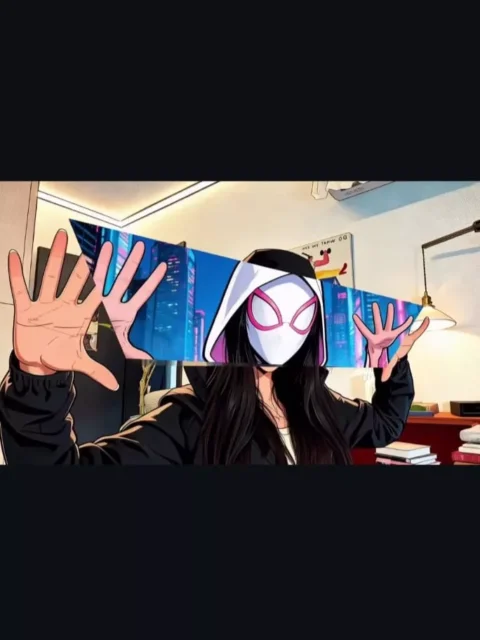
Template 1: Spider Man Character Edit
This option is suitable for a dramatic character or superhero-style transformation. A confident opening clip, a clear face and enough empty space around the body generally make transformation effects easier to see. Avoid using downloaded film scenes, copyrighted artwork or another creator’s footage unless you have permission to use it.
Use this option for a modern social-media edit featuring quick changes, beat synchronization and a polished trend-style finish. Prepare several short recordings from different angles so you can match the media slots shown in the preview.
Template note: Test both buttons on a mobile device before publishing this post. A template creator may remove, rename or restrict a project. The number of clips and available effects can also change. These buttons are provided only for convenient access to publicly shared CapCut templates.
Which Clips Should You Prepare?
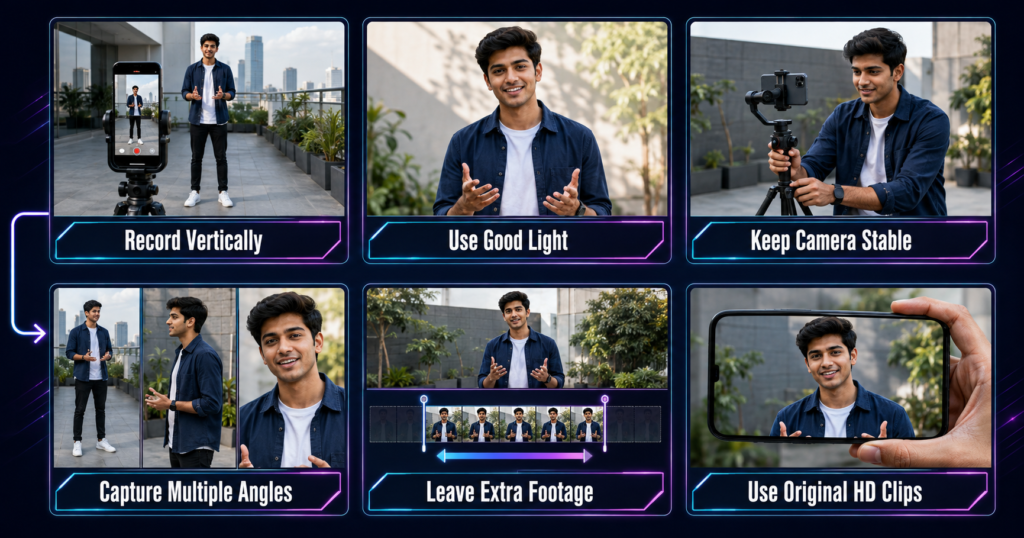
Friends, good source footage makes a major difference. Record vertically in 9:16, clean the lens, use soft daylight and stabilise the phone with a tripod or careful hand support.
Hold each pose for four or five seconds and record a confident walk, close-up, side look, hair adjustment and final pose. These variations provide enough choices for a multi-slot edit.
Keep your face and body away from the edges because zooms and crops may cut them off. Choose a simple background without crowds, signs or moving traffic.
For another example of recording an attitude-based walking clip, see the Nachaiab Hathiyar Se CapCut Template guide. Never record on an active road, lean on an unknown vehicle or enter private property without permission.
How to Use the Trending Reels CapCut Template
CapCut’s current mobile workflow uses a Template section rather than the “Discover” wording shown in some older tutorials. The exact button names may differ slightly by device or app version.
Install or update the official CapCut application on your phone.
Tap one of the template buttons provided in this article.
Allow the link to open in the official CapCut app.
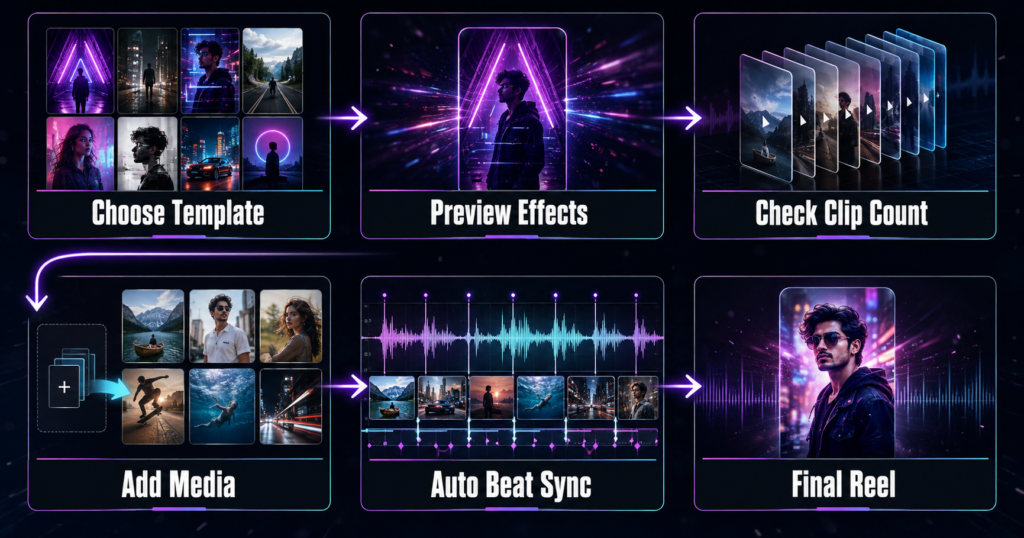
Watch the complete preview and note the number and type of media slots.
Tap Use Template, Use Template in CapCut or the equivalent button displayed on your device.
Select your photos or videos in the same order as the preview.
Tap Preview or Next and wait while the app creates the edit.
Check every crop, transition, text layer and effect.
Replace or trim any clip that does not fit correctly.
Tap Export and save the finished Reel to your device.
CapCut’s official template guide also explains that mobile users can select a template segment and edit, replace or crop the inserted media before export.
How to Customize the Editing After Using a Template
For a more personal result, open Edit, Edit More or the equivalent option after previewing. You may be able to replace clips, correct cropping, add text, adjust volume, apply a filter or include captions.
Keep customization controlled. Correct the crop and timing first, then adjust editable text or colour. Too many extra flashes, stickers and transitions can hide the subject.
Some creator media may be locked. A template with a Pro badge may require a paid subscription, so choose an option without Pro-only assets if you prefer a free edit.
For a very different emotional editing concept, you may also like the Mahadev Edit CapCut Template, which uses a devotional reveal and cinematic visual effects.
Best Export Settings for Reels
For a vertical Reel, select 9:16 and use 1080 × 1920 resolution when supported. A clean 1080p export is usually more practical than forcing 4K on an older phone.
Before saving, confirm that faces are sharp, text remains inside the safe area and every clip lasts long enough. Instagram or YouTube may apply separate music-licensing rules after upload.
You can also check our 15 August CapCut Template to see how vertical framing and visible background space help a large transformation effect look more natural.
Common Problems and Easy Fixes
The template link does not open
Open the page on a mobile browser and confirm that the official CapCut app is installed. Update the app, tap the button again and allow the browser to open CapCut. Avoid unknown APK files or websites asking for account credentials.
The Template button is missing
Template discovery is not available in every region, device or application version. CapCut’s official help pages state that the button may not appear where the feature is unsupported. Try the direct link, update the app or select another available template.
The gallery does not show your clips
Check CapCut’s photo and video permissions in your phone settings. Confirm that the files are stored locally and use a common format. Reopen the application after changing permissions.
The crop cuts off your face
Select the affected segment during preview and use the available edit or crop control. Reposition the clip, zoom out if possible or replace it with footage that has more empty space around the subject.
The export becomes stuck
Free some device storage, close unnecessary apps and keep CapCut open in the foreground. Turn off battery saver during rendering and avoid locking the screen. If 4K export fails, choose 1080p and try again. CapCut’s export troubleshooting guide also recommends checking storage and device interruptions.
The final video looks blurry
Use original HD clips rather than media downloaded repeatedly from WhatsApp or social media. Record in good light, avoid heavy digital zoom and choose the highest sensible export quality available on your device.
Safety, Privacy and Copyright Reminder
Download CapCut only from an official app store or website. Review permissions and keep private documents, addresses and other sensitive details out of a public template project.
Use only media you created or are permitted to use. Public template access does not automatically grant commercial rights to every song, film clip, logo or graphic in its preview.
RoyEditors is not affiliated with CapCut, Instagram, YouTube or the owners of Spider-Man and related trademarks. CapCut, its templates, logos and trademarks belong to their respective owners. We share publicly available template links for users’ convenience and do not host or claim ownership of the templates.
Frequently Asked Questions
Is the Trending Reels CapCut Template free?
Some templates can be used without payment, while templates containing Pro effects or assets may require a CapCut Pro subscription. Check the badge and export screen before adding your media.
How many clips do I need?
The exact number depends on the version. Watch the live preview and check the media-selection screen, which displays the required slots.
Can I use photos instead of videos?
Only when the selected template accepts photo slots. A motion-heavy Reel normally looks better with short video clips.
Can I change the music or text?
It depends on which elements the template creator made editable. Open the editing screen and check the available text, audio and segment controls.
Why is the template unavailable in my country?
CapCut features, music and community templates may vary by region, device and app version. The creator may also remove or restrict a project.
Can I use the finished video on YouTube Shorts?
Yes, a vertical export can be suitable for Shorts, but you must still follow YouTube’s copyright and community rules.
Will this template make my Reel viral?
No template can guarantee virality. It can help you recreate a popular editing format, but content quality, originality, timing and audience response determine performance.
What should I do if one link stops working?
Try the second option, update CapCut and revisit this page for newer links. Always use the official application rather than an unofficial download.
Conclusion
The Trending Reels CapCut Template helps creators follow new editing styles without manually building every transition and beat cut. Prepare clear vertical clips, follow the correct media order and inspect the preview before exporting.
Use templates as a starting point rather than a promise of instant views. A simple original recording with good lighting and a natural expression can perform better than a crowded edit. Keep checking RoyEditors for updated CapCut links, recording ideas and beginner-friendly editing guides.
Renu Mishra Roy is the founder and editor of Roy Editors. She writes about trending CapCut templates, VN codes, and AI photo editing, testing each template herself before publishing so readers get steps that actually work. Her guides focus on helping creators make clean, viral-style Reels and Shorts without wasting time on complicated editing.


2 thoughts on “Trending Reels CapCut Template 2026: Viral Reel Links”