The Raanjhana Ve CapCut Template helps you create an emotional, cinematic video without editing every clip manually. It combines an animated opening with stylish transitions, blur effects, slow motion, and music. You only need to select your clips. CapCut then applies the ready-made sequence automatically.
Short video trends change quickly on Instagram and other social platforms. A template is useful when you want to join a trend while it is still popular. It saves time and gives your video a polished look, even if you are a beginner.
In this guide, you will learn what the Raanjhana Ve template contains, why users are sharing this editing style, how to open the original template, and how to export your finished video.
What Is the Raanjhana Ve CapCut Template?
The Raanjhana Ve CapCut Template is a pre-designed video layout for CapCut. It arranges selected photos or video clips according to a fixed timeline. The music, clip duration, transitions, and effects are already added by the template creator.
This particular edit begins with an animated concept. It then moves into a cinematic clip sequence. Depending on the available template version, you may see blur, slow motion, zoom effects, beat-based cuts, and smooth transitions.
The emotional music and visual storytelling make the template suitable for a meaningful Reel. You may use it for a friend, sister, partner, or another person who is comfortable appearing in the video. Always ask permission before posting someone else’s photo or clip publicly.
Message Behind the Video
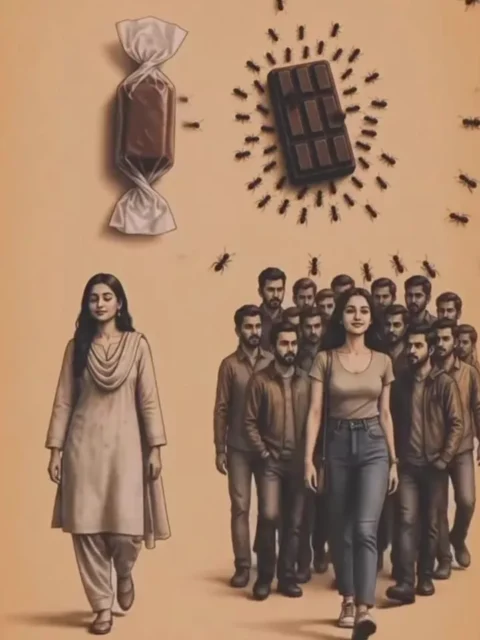
The animated introduction uses covered and uncovered chocolate as a visual metaphor while showing how people may react differently to women in public. This concept has attracted attention because it encourages discussion about privacy, dignity, and social behaviour.
However, this message should be shared carefully. A woman’s clothes never excuse staring, harassment, or abuse. Responsibility always belongs to the person who behaves inappropriately. Every woman deserves respect and safety, regardless of what she wears.
If you post this edit, consider writing a thoughtful caption. You can focus on consent, personal boundaries, dignity, and the responsibility to treat others respectfully. This makes the message clearer and avoids blaming women for the actions of other people.
Why Is This Editing Style Popular?
Many social media users prefer videos that tell a short story instead of showing random clips. This template has a clear beginning, a visual idea, and an emotional final sequence. That structure helps viewers understand the theme quickly.
The edit also uses effects commonly seen in Instagram Reels. Slow motion creates an emotional mood. Blur effects draw attention to the subject. Timed transitions help the visuals match the music. These elements make a simple phone video feel more cinematic.
Templates also remove much of the technical work. You do not need to create keyframes, adjust every transition, or synchronize all clips by hand. This makes the trend accessible to users who are new to mobile video editing.
Keep in mind that no template can guarantee views or make a video viral. Reach depends on several factors. These include the quality of your clips, the opening seconds, caption, posting time, audience response, and current interest in the trend.
Raanjhana Ve CapCut Template Link
Use the button below to open the publicly available template page in CapCut:
For more similar edits, visit the CapCut trend templates collection.
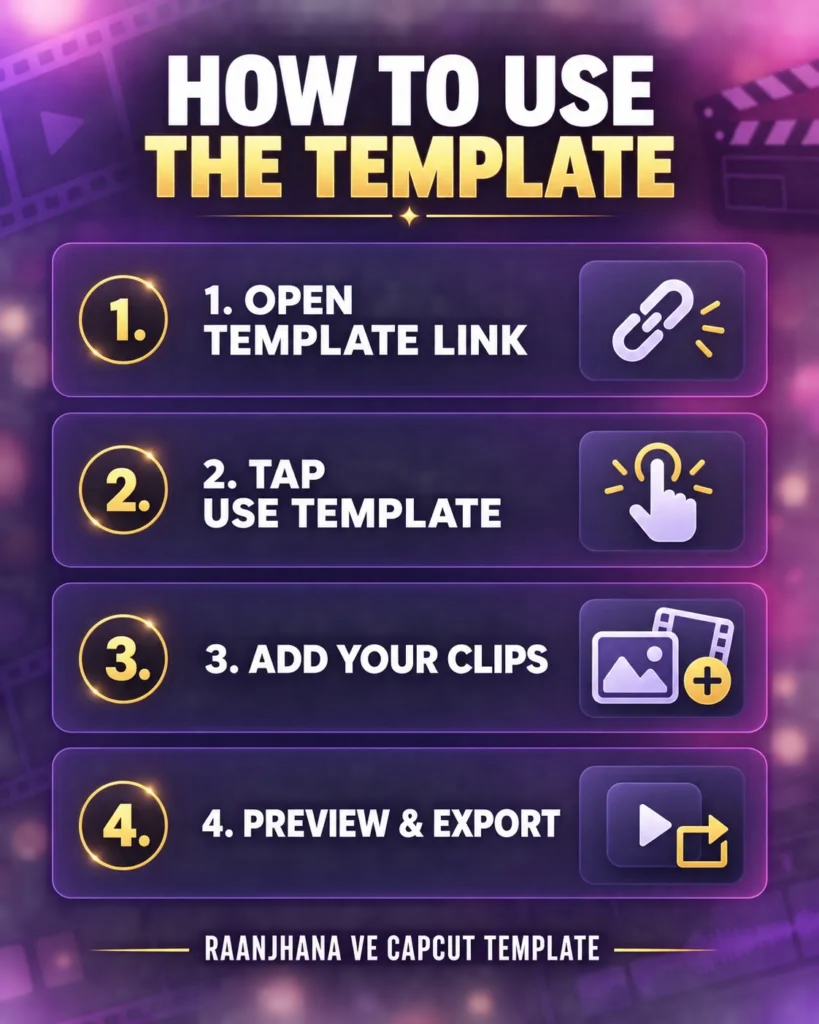
How to Use the Raanjhana Ve CapCut Template
Using the template is simple. Follow these steps on your mobile phone.
Step 1: Install or Update CapCut
Install the official CapCut app from your phone’s trusted app store. If it is already installed, update it before opening the template. An older version may fail to load newer effects or template links.
Step 2: Open the Template Link
Tap the Check Raanjhana Ve Template on CapCut button above. Your browser may ask whether you want to open CapCut. Allow it to continue.
You should now see a preview of the template. Watch the complete preview before adding your media. This will help you understand the clip order and the type of content that suits each slot.
Step 3: Tap “Use Template”
Select the Use Template button. CapCut will display the number of photos or videos required. The exact number may vary if the template creator updates the design or if you open another version.
Step 4: Select Your Clips
Choose clear, well-lit clips from your gallery. Vertical footage usually works best for Instagram Reels and other short-video platforms. Try to select clips with the main subject near the centre. This reduces the chance of important details being cropped.
Add the media in the order you want it to appear. Use your strongest clip for the main reveal or emotional part of the edit.
Step 5: Preview the Result
Tap Next to let CapCut process the video. Watch the complete preview. Check faces, text placement, timing, cropping, and transitions.
If a clip looks awkward, go back and replace it. A short and stable video often looks better than a shaky or poorly framed one.
Step 6: Export Your Video
When you are satisfied, tap Export. Choose a high-quality setting supported by your phone. A vertical 1080p export is normally suitable for Reels.
Save the video to your device. You can then upload it to Instagram or another platform. Review the finished post before publishing, especially if it includes another person.
How to Find the Template Inside CapCut
If the direct link does not open, launch CapCut and visit its template or discovery section, if available in your version. Search for Raanjhana Ve. Open the results and compare their previews with the video style described in this article.
Template availability and app features may differ by device, app version, and region. Searching by name may also show several user-created versions. Check the preview carefully before selecting one.
What to Do If the Template Is Not Working
First, confirm that CapCut is installed and updated. Then close the app and open the template link again. If the browser page appears but the app does not launch, choose the option to open the link in CapCut.
You can also try copying the page link into another browser. A temporary connection problem may prevent the preview from loading. Changing between Wi-Fi and mobile data may help.
In some regions, CapCut or certain templates may be unavailable. Roy Editors does not control regional access, template removal, or changes made by the template creator. If the link is unavailable, search for the template name inside the official app or try again later.
Tips for a Better Raanjhana Ve Edit
Use vertical clips recorded in good light. Keep the background clean so the subject remains easy to see. Avoid placing important details close to the top or bottom edge because platform buttons and captions may cover them.
Do not overload the edit with extra text, stickers, or filters. The template already includes a visual style. Too many additions can make the video look crowded.
Choose media that supports the intended message. If the video discusses privacy or respect, use a caption that clearly rejects harassment and supports personal dignity. Avoid captions that judge women or suggest that their safety depends on their clothing.
Before publishing, confirm that you have permission to use every person’s image. This is especially important when the video includes children, friends, relatives, or private moments.
Frequently Asked Questions
Is the Raanjhana Ve CapCut Template free?
CapCut templates are generally available to use through the app, but some effects, export options, or features may vary by account, device, subscription, and region. Review any notice shown in CapCut before exporting.
Can I use photos instead of videos?
It depends on the media slots created by the template designer. CapCut will show whether each slot accepts a photo, video, or both when you select your media.
Why does the template link not open?
The app may be outdated, the template may have been removed, or the feature may not be available in your region. Update CapCut and search for the template name inside the app.
Can this template guarantee viral views?
No. A template can improve the style and timing of your edit, but it cannot guarantee reach. Original clips, viewer retention, caption quality, and audience engagement also affect performance.
Can I remove the CapCut watermark?
Export options can change across app versions and regions. Use only the choices offered in the official CapCut app. Do not use untrusted third-party tools that ask for account details or unnecessary permissions.
Conclusion
The Raanjhana Ve CapCut Template offers a quick way to create an emotional Reel with an animated opening, smooth effects, and cinematic clip transitions. Open the template, select your media, preview the result, and export the finished video.
The edit can also begin a useful conversation about privacy, consent, and respect. Share that message responsibly. Clothing never justifies harassment, and everyone deserves to feel safe in public.
Try the template through the link above. For more viral editing tutorials and ready-to-use templates, explore Roy Editors regularly.
Disclaimer: Some CapCut templates may not work in certain regions because of app or regional restrictions. If the button does not open, try again later or open the link directly in the official CapCut app. Roy Editors is not affiliated with CapCut. CapCut, its logo, templates, and related trademarks belong to their respective owners. This website only shares publicly available links for users’ convenience.

Renu Mishra Roy is the founder and editor of Roy Editors. She writes about trending CapCut templates, VN codes, and AI photo editing, testing each template herself before publishing so readers get steps that actually work. Her guides focus on helping creators make clean, viral-style Reels and Shorts without wasting time on complicated editing.
2 thoughts on “Raanjhana Ve CapCut Template: Create the Viral Reel in One Click”