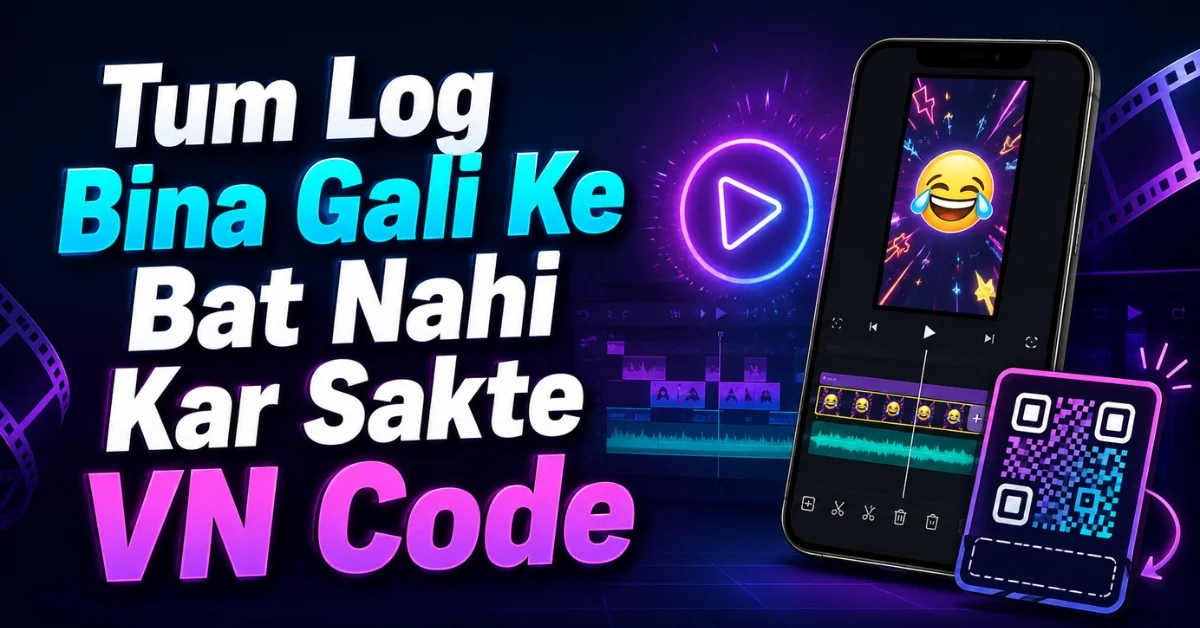
Want to create a funny, dialogue-based reel without spending hours cutting clips, adding text, and matching every scene manually? The Tum Log Bina Gali Ke Bat Nahi Kar Sakte VN Code gives you a ready-made editing structure that can be imported into the VN Video Editor through a QR code. Add your own opening clip, check the timing, and turn an ordinary video into a short and entertaining reel.
This trend works because its dialogue feels spontaneous, expressive, and familiar. The opening line creates curiosity, while the reply delivers the comic moment. That quick setup-and-punchline structure is ideal for Instagram Reels, YouTube Shorts, and WhatsApp Status videos, where viewers usually decide within seconds whether to continue watching.
In this guide, you will find the QR-code download area, template details, complete scanning instructions, customization tips, export settings, and solutions to common VN errors.
Important: This page provides an independently written guide for creators. VN is a trademark of its respective owner, and this website is not presented as an official VN service.
What Is Tum Log Bina Gali Ke Bat Nahi Kar Sakte VN Code?
The Tum Log Bina Gali Ke Bat Nahi Kar Sakte VN Code is a shareable QR template for VN Video Editor. Instead of creating the entire edit from an empty timeline, you scan the code and load a project that may already contain the required text, clip timing, transitions, effects, and dialogue placement.
The reel begins with a statement asking whether the people in the video can talk without using strong or abusive language. It then moves into a comic response clip that gives the edit its energetic and relatable personality. The dialogue is often associated with a bold Bihari-style sense of humour, but creators from any region can use the format for a lighthearted reaction video.
Its appeal does not depend on complicated cinematic effects. The humour comes from the contrast between the opening question and the confident response. Add a natural reaction, a group moment, a college clip, or a friendship scene at the beginning, and the template does the rest of the storytelling.
Why This Funny Dialogue VN Template Is Trending
Short dialogue edits perform well when viewers understand the situation immediately. This format has several features that make it suitable for social platforms:
- The hook appears at the beginning instead of after a long introduction.
- The dialogue creates a recognizable and meme-friendly situation.
- The final response can surprise viewers and improve watch time.
- Users can personalize the reel with their own face, friends, or group clip.
- The format is short enough to replay naturally.
- The template removes much of the technical editing work.
However, no template can guarantee that a reel will go viral. Reach also depends on originality, clip quality, audience interest, posting time, caption, and viewer engagement. Treat the VN code as a creative shortcut, then add your own personality so the result does not look identical to every other version of the trend.
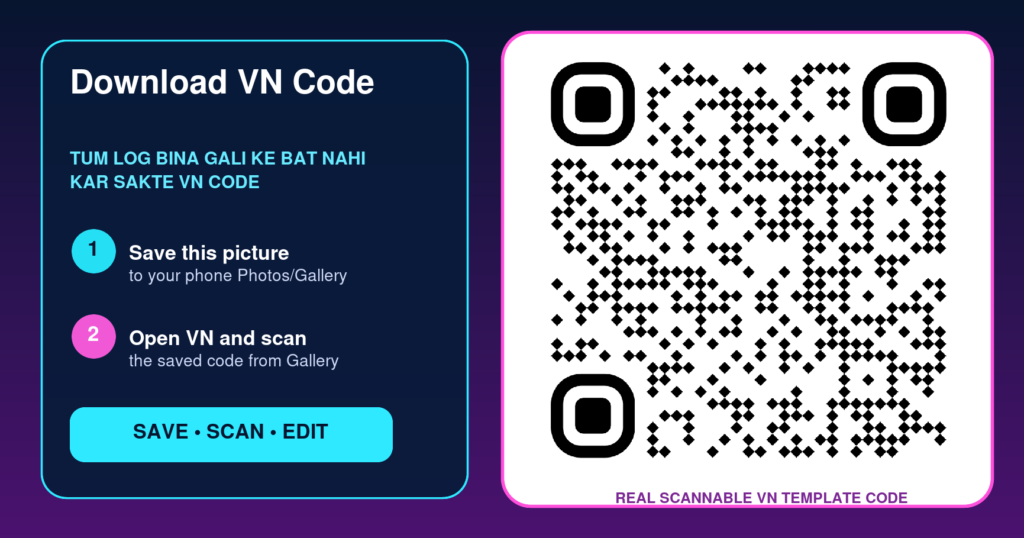
Tum Log Bina Gali Ke Bat Nahi Kar Sakte VN Code Download
Use the download area below to save the complete VN QR image to your phone. The image must remain clear and uncropped because removing a corner or covering part of the code can prevent VN from reading it.
How to Use Tum Log Bina Gali Ke Bat Nahi Kar Sakte VN Code
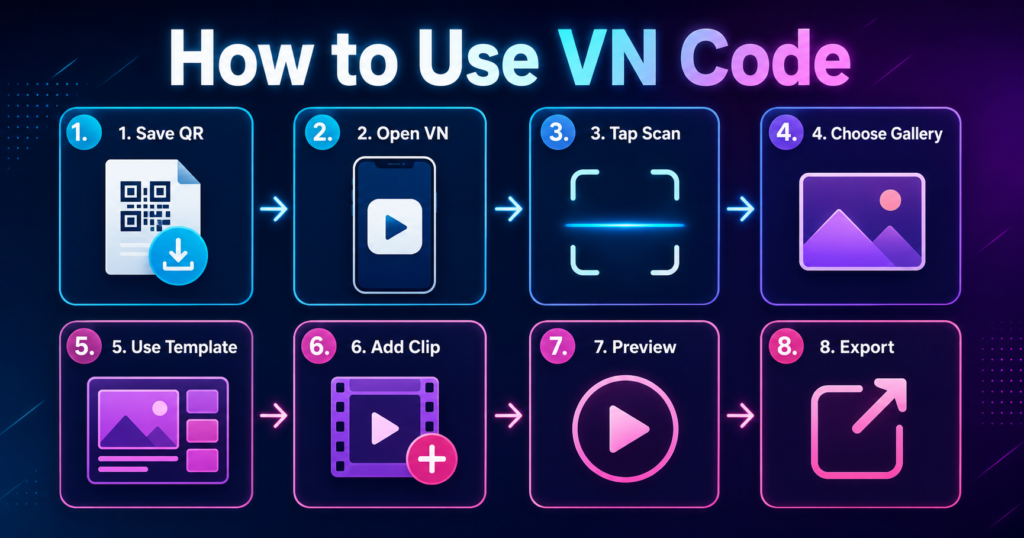
The process is simple even if you have never used a VN QR template before.
Step 1: Save the QR Code
Tap the download button and save the full-resolution code in your phone gallery. If you take a screenshot, ensure that all four edges are visible and no floating button covers the pattern.
Step 2: Open VN Video Editor
Launch VN and allow photo or media access if the app requests it. Without gallery permission, you may be unable to select the saved QR image or add your video.
Step 3: Open the Scanner
Find the Scan icon in VN. You may scan the code from another screen or choose the gallery option to import the saved image. VN’s official template guide confirms that its Scan tool detects a template QR code and loads the related template.
Step 4: Download and Use the Template
Wait for the preview to load, then choose the download or use option shown by the app. Avoid closing VN while the template resources are downloading.
Step 5: Add Your Own Clip
Select the video requested by the media slot. In most versions of this trend, your personal clip appears at the beginning, while the dialogue or reaction portion is already arranged in the template. The exact number of required clips can vary if the creator updates the project.
Step 6: Reposition and Preview
Use the crop or reposition control so your face stays inside the vertical frame. Play the complete preview and check the opening text, transition, dialogue timing, audio, and final cut.
Step 7: Export the Reel
When everything looks correct, tap Export. Save the result to your device before uploading it to Instagram, YouTube, or another platform.
How to Make Your Version Look Original
Thousands of creators may use the same trending VN code, so personalization matters. Start with footage that viewers have not already seen. If editing permissions are enabled, adjust the crop, colour, volume, or filter without disturbing the timing of the punchline.
You can also improve the published reel with an original caption, such as “Our group trying to stay polite for five minutes.” Use only relevant hashtags, for example #VNCode, #VNTemplate, #FunnyReels, and #DialogueEdit. Keep the hook fast and place any branding away from faces and subtitles.
You can also try our Name Kya Hai Sir Aap Logo Ka VN Code.
Recommended VN Export Settings
For a clear social-media upload, use a vertical 9:16 project and export at 1080p when your original footage supports it. A frame rate of 30 fps is sufficient for most dialogue reels. If the source clip was recorded at 60 fps and the template contains fast motion, 60 fps may produce smoother results but will create a larger file.
Do not increase resolution beyond the quality of the source video. Exporting a blurry 480p clip at 4K will not restore lost details. Good lighting, a clean camera lens, and steady original footage make a bigger difference than an unnecessarily high export setting.
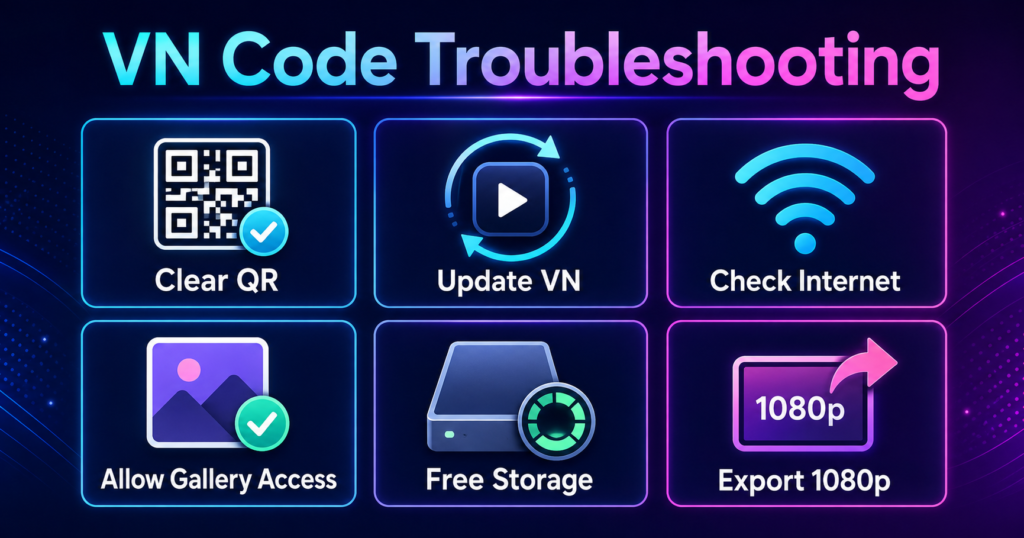
Common Problems and Quick Solutions
VN Cannot Scan the QR Code
Download the image again and make sure it is complete, sharp, and not cropped. Increase screen brightness if scanning from another device. When importing from the gallery, choose the original image rather than a compressed copy sent through a messaging app.
The Template Does Not Load
Check your connection, update VN, and try again. The creator may have removed the template, changed access permissions, or allowed the link to expire. In that case, only a new working code from the template provider will solve the issue.
Your Face Is Cut Off
The media slot may use a different crop from your original video. Select the clip and reposition it so the important subject remains in the safe area. Vertical source footage usually requires less adjustment.
Text or Transitions Cannot Be Edited
VN template creators can restrict which elements users may change. If text, stickers, transitions, frame ratio, or clip order is locked, this is usually a template permission rather than an app fault.
Audio Is Missing or Out of Sync
Preview the project after all resources have downloaded. Do not shorten the replacement clip unless the template permits it. If the included audio is unavailable, use music or dialogue only when you have the right to publish it.
Export Is Stuck or Fails
Free some device storage, close unnecessary apps, restart VN, and export again. If 1080p fails on an older phone, test a lower resolution to determine whether limited memory is causing the problem.
Frequently Asked Questions
Is Tum Log Bina Gali Ke Bat Nahi Kar Sakte VN Code free?
The code may be offered free by the page hosting it, but availability and usage conditions depend on the template creator. Review any stated terms before using it commercially.
Do I need VN Pro to use this QR template?
Many VN QR templates can be imported in the free app, although a project may contain resources or restrictions chosen by its creator. Open the preview to see what is available on your device.
Can I scan the VN code from the same phone?
Yes. Save the code to your gallery, open VN’s scanner, and select the image through the gallery option. You can also display the QR code on another device and scan it with your phone.
How many clips are required?
The common version focuses on one personal opening clip followed by the prepared reaction, but the number of media slots can vary between template versions. VN will show the exact requirement after loading the code.
Can I change the text in the template?
You can change it only if the template creator has allowed that element to be edited. Locked text cannot normally be modified from the filled-template editor.
Can I use the finished video on Instagram and YouTube?
Yes, the vertical format is suitable for Instagram Reels and YouTube Shorts. Make sure you have permission for all included media and audio before publishing.
Why does the QR code say invalid or expired?
The image may be damaged, the internet may be unavailable, or the shared template may no longer be accessible. Try a clear original image first; if it still fails, request an updated code.
Which export quality is best?
For most reels, 1080p at 30 fps provides a good balance between quality and file size. Match the frame rate and quality to your original footage whenever possible.
Final Words
The Tum Log Bina Gali Ke Bat Nahi Kar Sakte VN Code is a quick way to create a bold and funny dialogue reel without rebuilding every effect manually. Save the genuine QR image, import it through VN, add a natural opening clip, check the crop and timing, and export the finished video in clear vertical quality.
The template provides the structure, but your own expression and situation make the reel worth watching. Use original footage, keep the joke fast, respect content rights, and always preview the complete edit before publishing.